
OpenClaw 2026.8.1 to 2026.9.2 Upgrade Crash Loop: The Fix Order
Twelve upgrade reports were filed against OpenClaw 2026.8.1 and against the 2026.9.1 to 2026.9.2 path between August 31 and September 7, 2026. This page groups them by symptom, quotes the command each reporter used, and gives the order that avoids discovering the blockers one restart at a time.
Upgrade reports have been filed against two OpenClaw release lines in eight days: six against 2026.8.1 between August 31 and September 1, 2026, and six against the 2026.9.1 to 2026.9.2 path between September 5 and September 7, 2026. In both lines every reporter was upgrading an install that already carried state from an earlier version, and the symptom repeats: the package swap finishes and the gateway stays stopped. Issue #135150 counted 116 restarts from a single warning on 2026.8.1. OpenClaw 2026.8.2 followed on September 1, 2026 at 16:00 UTC with upgrade-safety work in its notes, and two of the six 8.1 reports were still open after it. This page groups the reports by what the reader sees on screen, quotes the command each reporter used, and puts those commands in the order that avoids finding the blockers one restart at a time. The 9.x reports, and the two fixes merged for them, have their own section below.
What the gateway is doing
In plain words: the new version wakes up, looks at the files the old version left behind, and refuses to run until they are converted. Every reporter hit a different leftover, and each one surfaced only after the previous one was cleared. Issue #134896, filed September 1, 2026, lists five of them in sequence on one machine, each discovered after its own restart. That is why the order below matters more than any single command.
Symptom 1: crash loop with a migration warning as the only cause
According to the stack trace in issue #135150, 2026.8.1 refuses to start when its startup migration produces any warning at all, and a plugin one minor version behind is enough to produce one. The reporter's codex plugin was still on 2026.7.1-1 while the core had moved to 2026.8.1. The command that cleared it, quoted from issue #134896:
openclaw plugins update codex --accept-capabilitiesDo this for every installed plugin before anything else. The issue was open when this page was written on September 1, 2026.
Symptom 2: a configured plugin is gone after the upgrade
Issue #135002, filed September 1, 2026, describes an Ubuntu install where plugins.entries.duckduckgo survived the upgrade in the config while the package itself did not, and openclaw config validate --json reported the missing plugin on every run. Issue #134896 hit the same package as a hard boot blocker, Plugin duckduckgo requires capability consent, and cleared it with:
openclaw plugins install @openclaw/duckduckgo-plugin --accept-capabilitiesThe 2026.8.1 notes list nine provider packages that are now installed on demand and name openclaw update repair and openclaw doctor --fix as the recovery commands for missing configured packages.
Symptom 3: exit code 78 and a log that stops at "starting..."
Issue #135038, filed September 1, 2026 from a macOS install with about 22 agents, found the launchd service exiting with code 78 on every start and its stderr piped to /dev/null. Running the gateway in the foreground showed the real reason: Legacy session store requires migration. The reporter states that openclaw doctor --fix skipped that migration, and that it completed only when every agent was targeted explicitly:
openclaw doctor --session-sqlite import --session-sqlite-all-agents --yesIssue #134896 confirms the same behaviour on Linux: the default target migrated main, the next start failed on the next agent, and so on. Run the all-agents form once.
Symptom 4: doctor --fix tells you to run doctor --fix
Part two of issue #134896 reports every chat message, heartbeat and cron job failing with Legacy workspace setup state requires migration, and doctor --fix ending each run on a message asking for doctor --fix. The reporter resolved it by inspecting the dist source by hand. A related report, issue #135079, said 2026.8.1's doctor persisted unresolved model environment references as literal API keys; it was closed on September 1, 2026. After any doctor run on 2026.8.1, open openclaw.json and check what it wrote. The 2026.8.2 notes list a Migration safety item under Fixes that coordinates doctor repair with the current owner of the agent database.
Symptom 5: the multi-agent owner is unset
The fifth blocker in issue #134896 appeared only on openclaw status --all: Multiple agents are configured, but this operation has no explicit owner. The reporter cleared it with:
openclaw config set agents.defaults.systemAgent.agentId mainSymptom 6: Anthropic returns HTTP 400 on every model
Issue #134951, filed September 1, 2026, reports that on 2026.8.1 every request to api.anthropic.com/v1/messages fails with HTTP 400 and the message provider rejected the request schema or tool payload, on both Opus and Sonnet, with a key that returns 401 when revoked, so authentication itself works. The reporter could not test a downgrade because 2026.7.1 aborted on a config-invalid error after 2026.8.1 had migrated the config. The project's review bot kept the issue open for maintainer follow-up on September 1, 2026 and stated it could not reproduce the request without a credential. No fix was published when this page was written. Run the documented probe after any upgrade and keep the pre-upgrade backup until it passes:
openclaw models status --probeThe order that avoids the restart treadmill
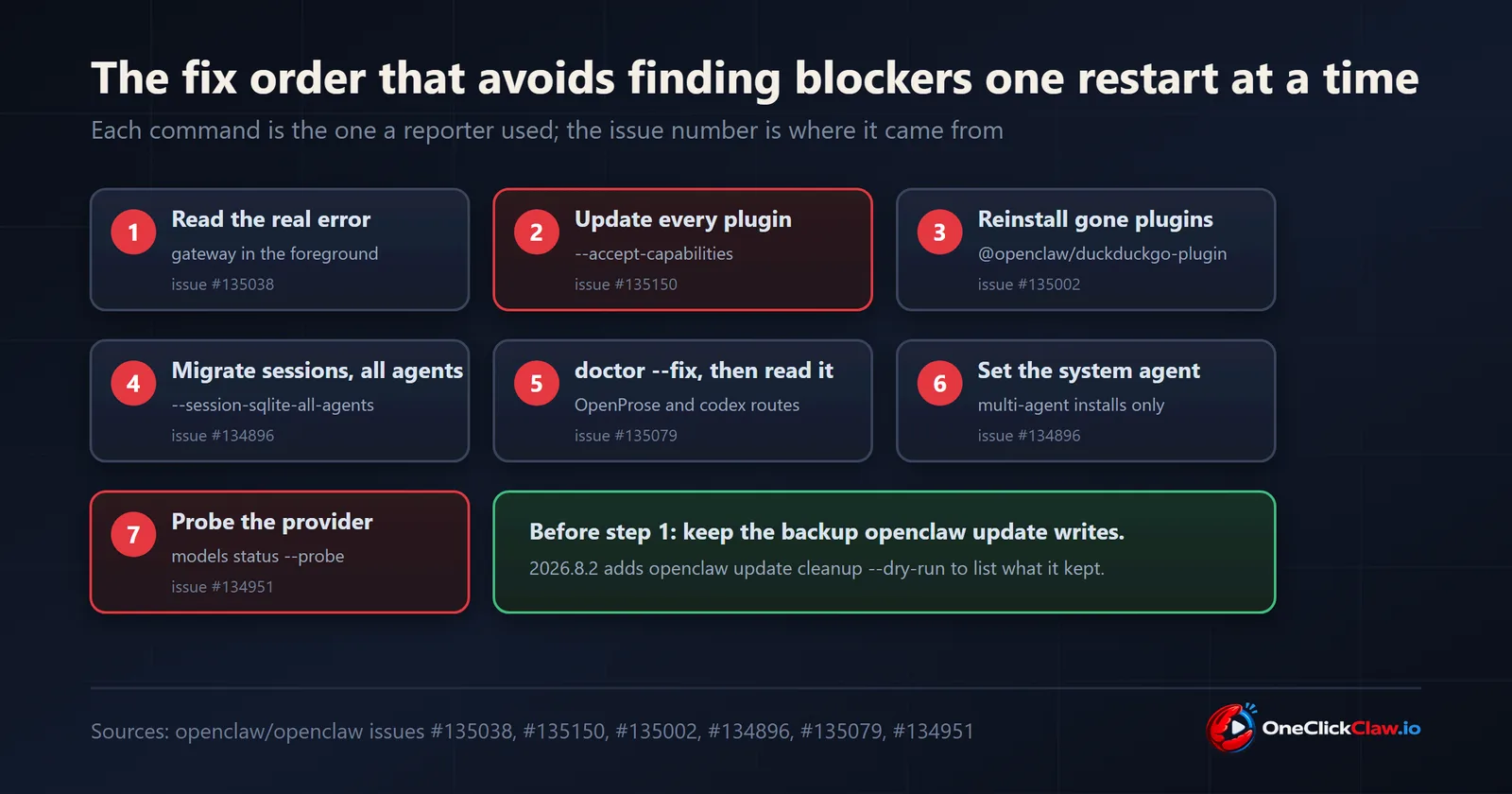
- Take the backup
openclaw updatewrites, and note where it is. The 2026.8.2 notes addopenclaw update cleanup --dry-runto list retained originals before anything is removed. - Run the gateway in the foreground once to read the real exit reason (issue #135038).
- Update every plugin with
--accept-capabilities(issues #135150, #134896). - Reinstall any externalised plugin the config still references (issue #135002).
- Migrate the session store for all agents in one pass (issues #135038, #134896).
- Run
openclaw doctor --fixfor the two breaking migrations the 2026.8.1 notes require, the OpenProse removal and the codex to openai route change, then read the config it wrote (issue #135079). - On multi-agent installs, set the system agent (issue #134896).
- Probe the provider (issue #134951). If Anthropic returns 400, restore the backup and stay on the previous version until the issue closes.
A fresh install behaves differently from an upgrade
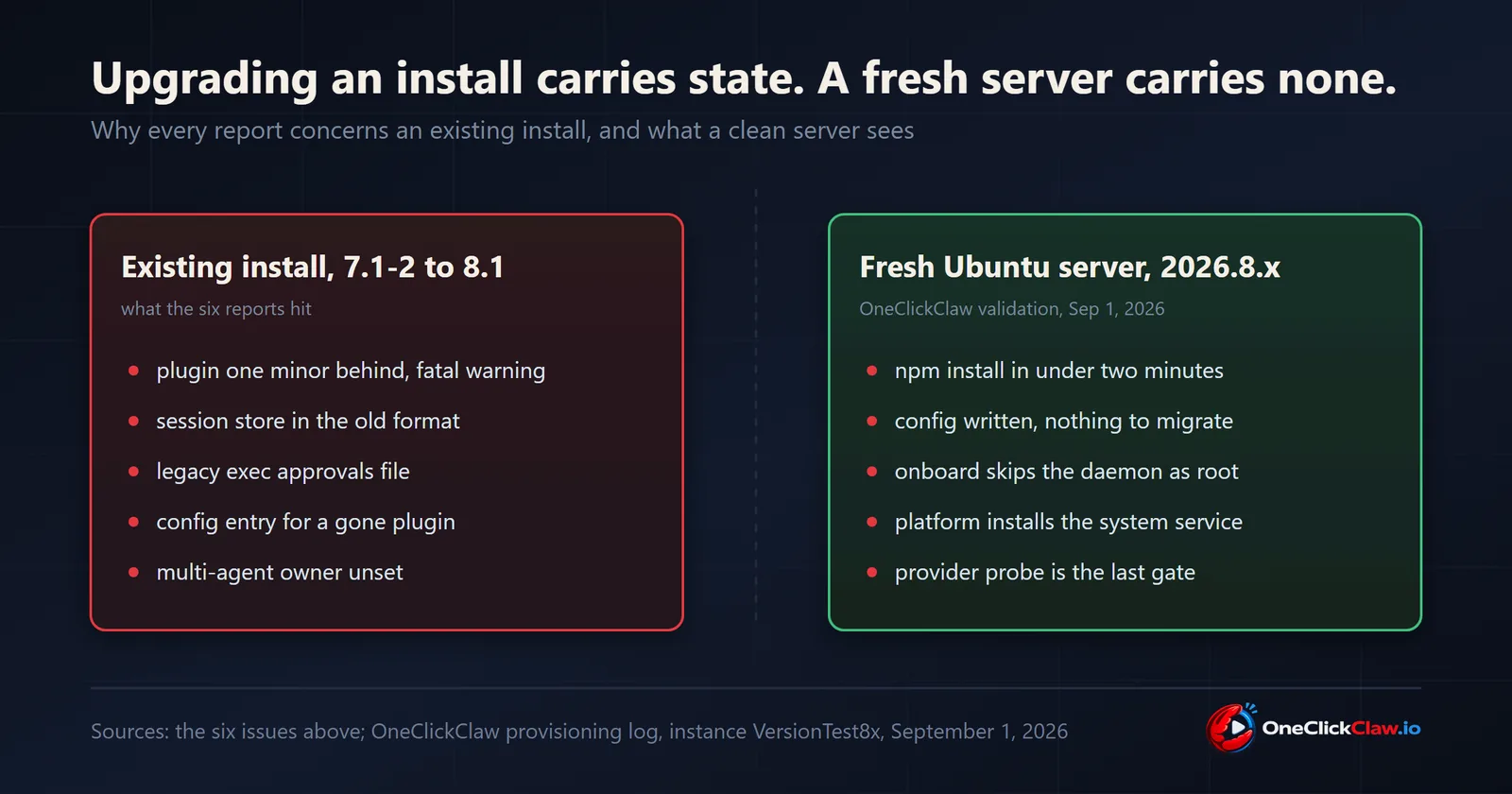
Every report above concerns an existing install carrying state from 2026.7.1-2. On a fresh Ubuntu 24.04 server with 2 vCPU and 4 GB, provisioned on September 1, 2026 as part of OneClickClaw's own validation of the release, 2026.8.1 installed from npm in under two minutes and wrote its configuration with none of the migrations above, because there was nothing to migrate. One difference did appear: run as root from cloud-init, openclaw onboard --install-daemon printed Systemd user services are unavailable; skipping service install and exited with code 1 after writing the config. The way through is the one the message itself suggests, a one-shot onboard followed by a system-level service unit, which is how a OneClickClaw server has always run its gateway. A gateway that answers on Telegram at three in the morning is a gateway running as a service on a machine that never sleeps.
What 2026.8.2 changes for upgrades
The 2026.8.2 notes, published September 1, 2026, list under Highlights a Safer upgrades item: preserve newer configuration, stop incomplete session migrations before claiming success, and recover a stopped Gateway after a failed update when the installed package or rollback is verified safe (pull requests #134025, #134228 and #119516 in the notes). Under Fixes they add a Plugin SDK compatibility item that preserves existing command definitions when upgrading from 2026.8.1, a hardened npm update path for hosts running with ignore-scripts=true, and a Bun 1.4 gateway connection fix. Issues #135150 and #134951 remained open after 2026.8.2 shipped, so an upgrade to 2026.8.2 should follow the same order above.
The same pattern in the 9.x line, September 5 to 7, 2026
OpenClaw 2026.9.2 was published on September 5, 2026 at 20:00 UTC and opens its notes with a Reliable upgrades and recovery highlight. Six reports were filed against the path into it over the following two days. Three of them are closed. Issue #139383, filed September 5 and closed September 6, 2026, reports a macOS npm upgrade from 2026.9.1 that replaced the package and then failed the service refresh with ENOENT for dist/shared-DFJEouXv.js, leaving the LaunchAgent unloaded and the app showing Updating. Issue #139707, filed and closed on September 6, 2026 within twelve minutes, names the cause in its title: the post-swap restart path lazily imports content-hashed chunks that the swap had already deleted. That report records the update exiting code 79 with recovery.serviceRestartSafe: false. Issue #140230, filed and closed on September 6, 2026, describes a 2026.7.1-2 to 2026.9.2 upgrade where the package swap succeeded, the doctor step failed on a pending legacy session-store migration, and the recovery restart then used the older in-process binary, which refused to act on configuration already written by 2026.9.2.
Three were still open on September 7, 2026. Issue #139485 reports a managed upgrade leaving the gateway offline while finalization stays nonterminal. Issue #139714, with eight comments, reports that the post-core update resume child admits an update_runs row that no code path can finalize, so openclaw status keeps reporting an update in progress. Issue #139284 tracks update-run terminalization and late progress recovery. A separate open report, issue #137813 with eleven comments, filed September 4, 2026, concerns Windows 11: the 2026.9.1 update regenerates gateway.cmd with a new --task-supervisor flag, and the reporter states the process then exits without spawning the gateway.
Two pull requests have merged against this path. Pull request #139660, merged September 6, 2026 at 04:10 UTC, finishes npm upgrades from 2026.9.1. Pull request #140784, merged September 7, 2026 at 06:08 UTC, refuses schema bumps under unfenced updaters. Neither is in a published release. The newest release on the repository is v2026.9.2 of September 5, 2026, checked against the releases endpoint on September 7, 2026. Until the next release ships, an upgrade lands on the version without those two merges, so the order above applies to the 9.x line as well: read the real exit reason first, keep the backup that openclaw update writes, and treat a gateway that stays stopped after a successful package swap as a restart-path failure, which is what all three closed reports turned out to be.
If you would prefer to skip the migration altogether
A OneClickClaw server is provisioned fresh at a pinned version on its own Ubuntu machine, with the gateway installed by the platform as a system service and the model key, channels and workspace pushed back after the server is ready. Moving between versions is a clean reinstall on a version chosen from the dashboard, which the platform validates on a real server before it is offered. There is no session store to convert and no plugin left one minor behind, because the new version is the only version the server has ever run.
Frequently asked questions
- Does the crash loop mean 2026.8.1 is broken?
- The reports filed on September 1, 2026 describe upgrades of existing installs, and each one traces the loop to state left over from the older version: a plugin still on 2026.7.1, a session store in the old format, or approvals in a legacy file. A fresh install on a clean server carries none of that state.
- Is 2026.8.2 the fix?
- The 2026.8.2 release notes of September 1, 2026 list safer-upgrade work: keeping newer configuration, stopping incomplete session migrations before claiming success, and restarting a stopped Gateway after a failed update. The crash-loop report #135150 and the Anthropic report #134951 were still open when this page was written, so 2026.8.2 leaves items below unresolved.
- Does 2026.9.2 fix the upgrade problems?
- The 2026.9.2 notes of September 5, 2026 open with a Reliable upgrades and recovery highlight. Six reports were filed against the path into that release between September 5 and September 7, 2026, three of them closed. Two pull requests for that path have merged, #139660 on September 6 and #140784 on September 7, and neither is in a published release yet: the newest release is v2026.9.2 of September 5, 2026. Run the order on this page for an upgrade into the 9.x line too.
- Can I go back to 2026.7.1?
- One reporter in issue #134951 tried, and the downgrade aborted on a config-invalid error because 2026.8.1 had already migrated openclaw.json. Restore the backup that openclaw update keeps, or the pre-upgrade snapshot, before running the older binary.
- What does OneClickClaw do differently?
- A OneClickClaw server is a fresh Ubuntu machine provisioned at a pinned version, with the gateway installed as a system service by the platform. Moving to a newer release is a clean reinstall on a chosen version, with keys and channel settings pushed back afterwards, so there is no legacy state for the new version to trip over.
Related guides
- OpenClaw stuck on starting, or the gateway will not come upA gateway that hangs on starting is nearly always failing for a reason it already wrote to the logs. Read the logs first, because the five causes below have five different fixes and guessing between them wastes the most time.
- Where is the OpenClaw config file, and how do you change its location?The short answer is ~/.openclaw/openclaw.json, written in JSON5. The longer answer matters when your edits appear to be ignored, which is almost always a second config file or an environment variable winning over the one you edited.
- OpenClaw error: openclaw: command not foundIn almost every case the install worked and the binary exists. Your shell simply does not have the global npm bin directory on its PATH, which is a two-line fix once you know which shell file to edit.
- Hermes Install Fails on Ubuntu 24.04: The Fix OrderThree open Ubuntu reports (issues 88529, 89343, 87460) describe silent install.sh failures. The fixes: install the official prerequisites plus libatomic1 before the script, give the Chrome for Testing download real time, then hermes doctor.