
How to Fix "Timed out connecting to Hermes backend after 15000ms"
The 15000ms timeout is a single slow answer from a healthy local backend, not a broken agent or a bad API key. Running the terminal version once warms the cache and clears it in most cases, and the underlying stall was repaired upstream in release v2026.7.1.
You open Hermes Desktop and instead of your agent you get a wall of red text: Timed out connecting to Hermes backend after 15000ms. Sometimes with a longer prefix, Error occurred in handler for 'hermes:api'. Sometimes the app opens fine and one panel dies with it, usually API keys or messaging platforms.
Here is the reassuring part, and it is true in almost every reported case: your agent is not broken and your API key is fine. Two programs on your own computer failed to shake hands in time. Nothing about the internet or your AI provider is involved yet.
What is actually happening
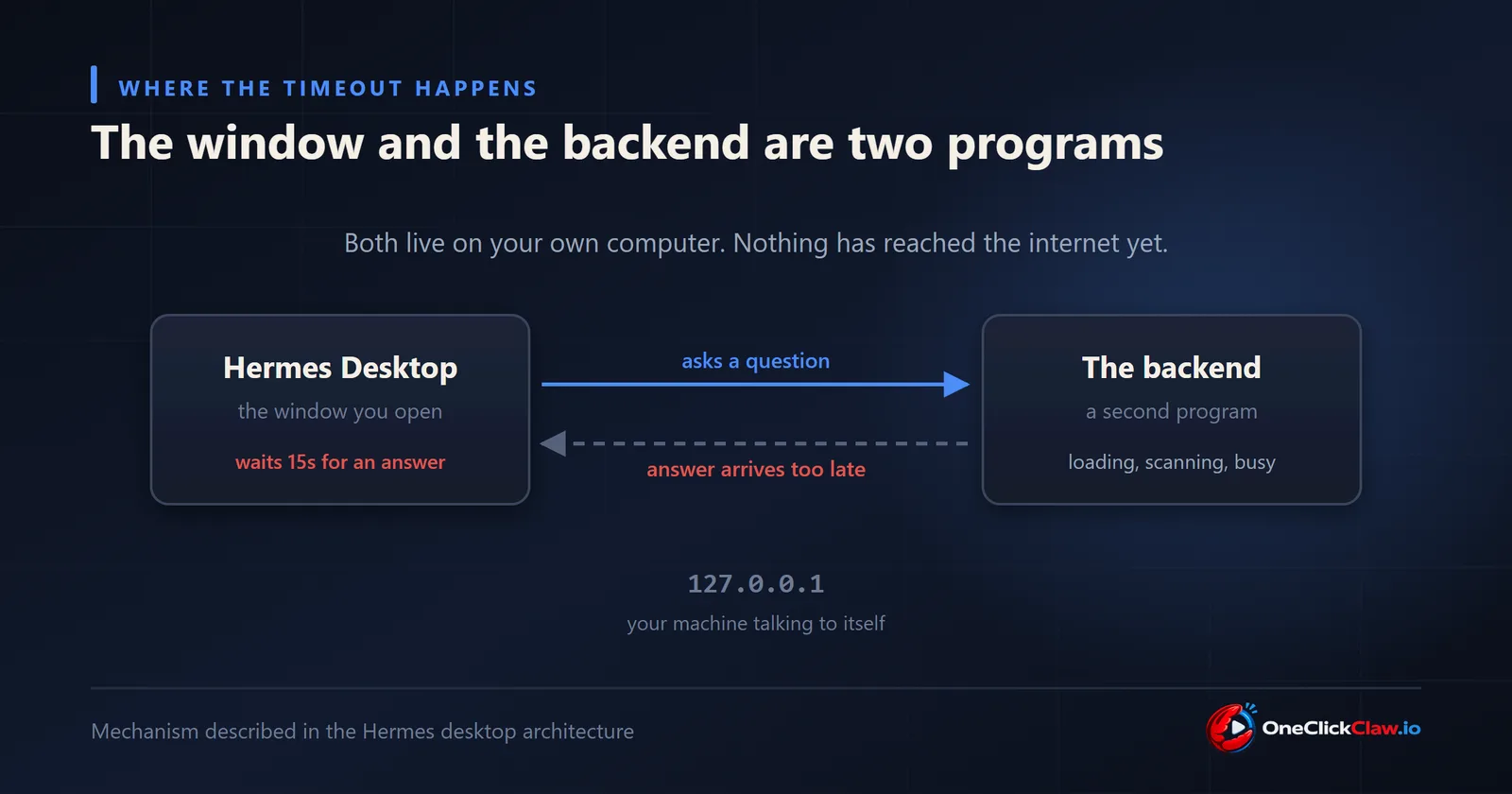
Hermes Desktop is a window, not the agent. When you launch it, it quietly starts a second program on your machine, the Python backend, and then talks to it over your own local network connection. The window is useless until that second program answers.
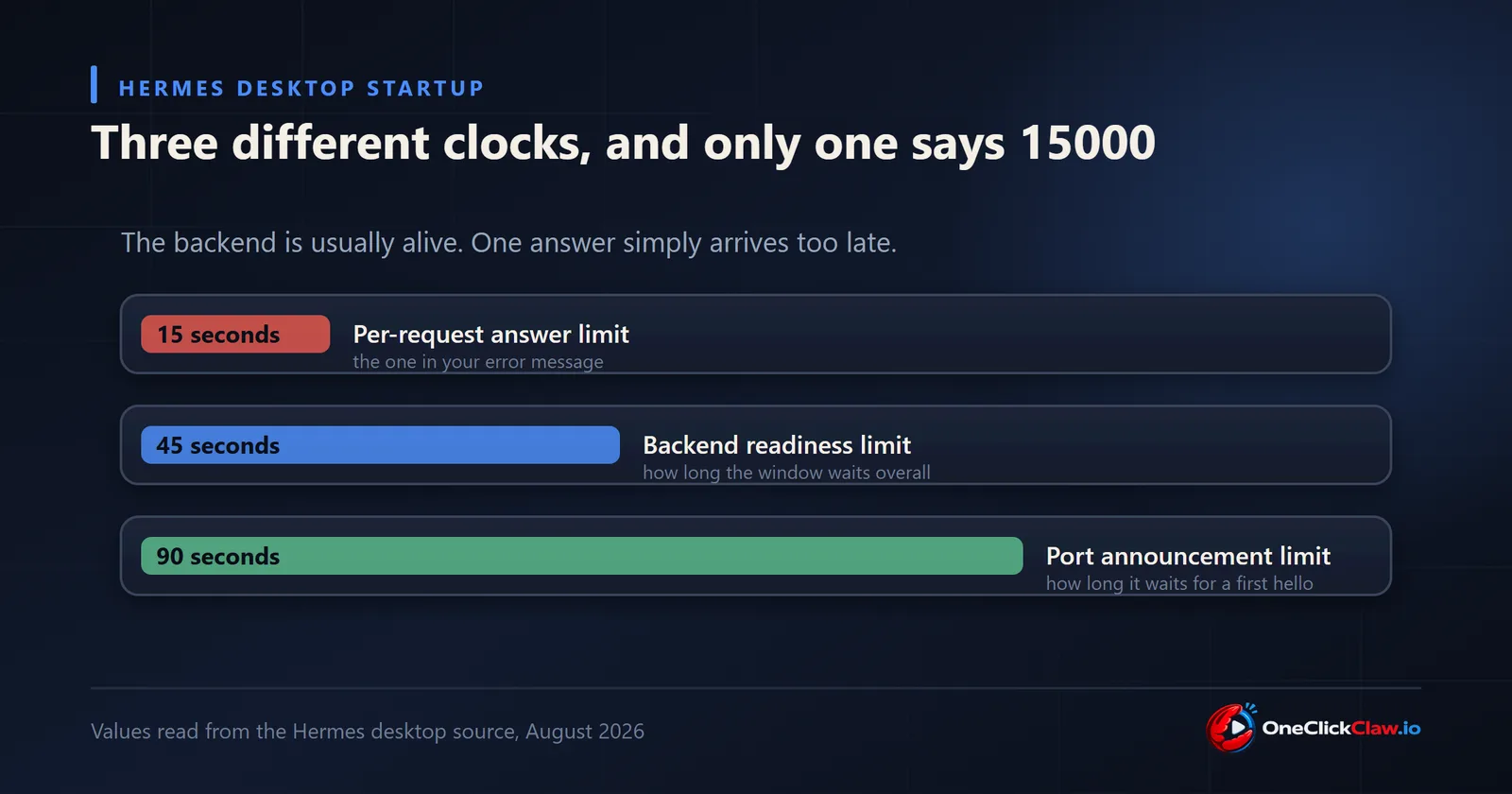
The 15000ms is the patience limit on a single question the window asks the backend. Fifteen seconds, then it gives up. It is not a total startup budget, which is why the number confuses people. The backend is usually alive and well by then. It is just too busy at that exact moment to answer.
Why too busy? On a first launch the backend has to load a very large amount of code. On Windows, your antivirus inspects each file as it is written to disk. That work happens on the same thread that is supposed to be answering the window, so everything queues behind it. On a cold machine that pause can run past twenty seconds. The window has already walked away at fifteen.
The fix that works most often, and it takes one line
Close Hermes Desktop completely. Then open a terminal and run the command line version once, on its own:
hermesLet it finish starting, then close it and open Desktop again.
This works because the slow part only happens once. Running the agent from the terminal makes your computer do all that heavy loading and all that antivirus scanning ahead of time, and cache the result. When Desktop starts afterwards, the backend answers in a moment instead of half a minute. Reported as reliably effective in issue 68705, and the mechanism is confirmed by the maintainer-merged fix described below.
If you are on an older build, update first
This exact stall was diagnosed and repaired upstream. Pull request 50345, merged by the project maintainer on 21 June 2026, moved the slow loading off the thread that answers the window and gave the startup handshake a far longer allowance. It shipped in release v2026.7.1.
So if your Hermes predates that release, updating is the real fix and the terminal trick is only a bridge to it.
When the app opens but one panel fails
This is the same illness in a different place. The app is up, and then "API keys failed to load" or "Messaging platforms failed to load" appears. One particular request is taking longer than fifteen seconds while everything else is fine.
Three specific offenders have been measured by the people who hit them:
- The profiles list reading giant files. If you have other command line AI tools installed alongside Hermes, their program files can be hundreds of megabytes, and the profile lookup was reading them from start to finish as if they were text. One reporter measured 17.9 seconds against the 15 second limit in issue 49663. This one is fixed in current builds.
- The messaging panel checking every platform one at a time. Thirty two checks in a row, six to twelve seconds each time you open it, described in issue 77048. Still open at the time of writing, so treat it as known rather than solved.
- The startup status check loading every adapter. One reporter profiled it and found a single unused chat platform library accounting for roughly 18 of 20 seconds, in issue 60144.
For all three, updating is the honest advice. There is no setting you can flip.
The advice you will see that does nothing
Search this error and you will find people recommending an environment variable called HERMES_DESKTOP_FETCH_TIMEOUT_MS, usually set to 90000, presented as the fix.
That variable does not exist. A search of the entire Hermes codebase returns no occurrences of it anywhere. It began life as a suggestion in a discussion thread and was never built. Setting it changes nothing, and the person who first proposed it later reported the same.
There is a real variable with a similar name, HERMES_DESKTOP_PORT_ANNOUNCE_TIMEOUT_MS, and it does exist. It controls a different clock, how long the window waits for the backend to first announce itself, and it will not move the fifteen second one. Useful for a slow machine that never finishes starting. Useless for this message.
What to check on your own system
Your logs will tell you which version of this you have. On Windows they live at %LOCALAPPDATA%\hermes\logs\desktop.log, and on macOS or Linux at ~/.hermes/logs/.
Look for the line HERMES_BACKEND_READY. If it is there, the backend started correctly and you have a slow answer rather than a failed start, which is the good version of this problem. On Windows, a flood of ConnectionResetError entries alongside it is the signature of the antivirus stall described above.
One more thing worth checking on Windows: leftover copies of the agent from failed attempts. Some people have found twenty or more still running quietly in the background, each holding memory. Open Task Manager and end any Hermes processes before your next attempt.
Why this whole family of problems exists
Step back from the specific message for a second, because the pattern matters more than the fix.
Every failure above lives in the same place: the desktop app on your own computer, trying to start and reach a second program on that same computer. Your antivirus, your PATH, your Python installs, your disk speed, whether the machine just woke up. None of that has anything to do with your agent doing useful work, and all of it can stop it starting.
An agent that lives on a server you never turn off skips this entire category. There is no desktop shell to boot, no local handshake to time out, and no laptop lid to close in the middle of a job. It starts once and stays up.
That is what we do at OneClickClaw. Today you can put an OpenClaw agent on a dedicated European server of your own, set up for you, from EUR 14.99 a month, with 7 days free and just an email to start. Hermes Agent hosting is on the way, so if you are here for Hermes, the OpenClaw side will show you exactly how the managed version feels while you wait.
Frequently asked questions
- Does this error mean my API key or my AI provider is broken?
- No. The message is about two programs on your own computer failing to reach each other in time, and it happens before your key or your provider is used at all. In most reports the backend is confirmed healthy and answering, just answering slower than the fifteen second limit allows.
- Why does it work on the second or third try?
- Because the slow part only happens once. The first launch after a restart, an update or a fresh install has to load and scan a large amount of code, and that work is cached afterwards. Later launches find the cache warm and answer quickly, which is also why running the terminal version once beforehand fixes it.
- Should I set HERMES_DESKTOP_FETCH_TIMEOUT_MS to a bigger number?
- That variable does not exist in Hermes, so setting it has no effect. It circulates widely as a fix because it was proposed in a discussion and never built. The similarly named HERMES_DESKTOP_PORT_ANNOUNCE_TIMEOUT_MS is real, but it controls a different stage of startup.
Related guides
- How to Fix "Hermes backend exited before it became ready"The number in the brackets decides everything. Zero means a healthy backend shut itself down, usually a Windows watchdog misfire, and any other number means it genuinely failed, usually an update applied while Hermes was still running.
- How to Fix "Could not connect to Hermes gateway"Two separate parts of Hermes are both called the gateway, which is why the obvious command does not help. The desktop needs the backend server on port 9119, and the fastest test is to start it by hand and let the app attach to it.
- OpenClaw 2026.8.1 to 2026.9.2 Upgrade Crash Loop: The Fix OrderTwelve upgrade reports were filed against OpenClaw 2026.8.1 and against the 2026.9.1 to 2026.9.2 path between August 31 and September 7, 2026. This page groups them by symptom, quotes the command each reporter used, and gives the order that avoids discovering the blockers one restart at a time.
- Hermes Install Fails on Ubuntu 24.04: The Fix OrderThree open Ubuntu reports (issues 88529, 89343, 87460) describe silent install.sh failures. The fixes: install the official prerequisites plus libatomic1 before the script, give the Chrome for Testing download real time, then hermes doctor.