
How to Fix "Hermes backend exited before it became ready"
The number in the brackets decides everything. Zero means a healthy backend shut itself down, usually a Windows watchdog misfire, and any other number means it genuinely failed, usually an update applied while Hermes was still running.
Hermes Desktop refuses to open and leaves you one sentence: Hermes backend exited before it became ready (0). Sometimes with Desktop boot failed in front of it. The window closes or sits on an error screen, and nothing you click helps.
Everything you need is in the number in the brackets, and almost nobody notices it. Zero and everything else are two completely different problems with two completely different fixes. Read the number first.
What the sentence means
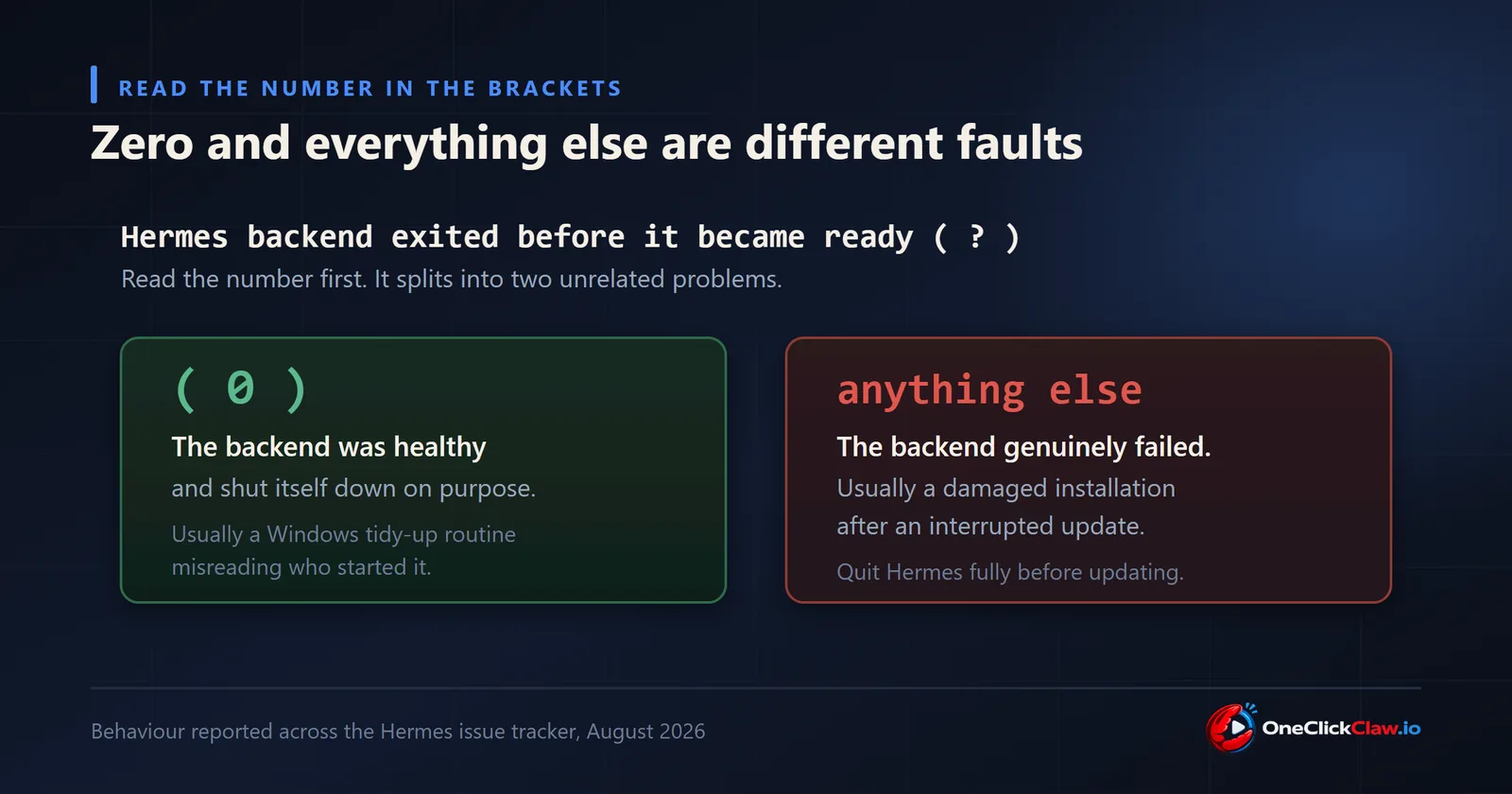
Hermes Desktop is a window that starts a second program, the backend, and waits for it to say it is ready. The message means the backend started and then stopped before saying anything. The number in brackets is how the backend reported its own ending.
In computing, zero is the success code. A program that crashed, or hit a missing piece, or was killed, does not exit with zero. It exits with zero only when its own code deliberately decides to shut down normally.
So (0) tells you something surprising and useful: the backend was healthy and it stopped itself on purpose. Any other number means it genuinely failed.
If the number is zero, it is almost certainly the Windows watchdog
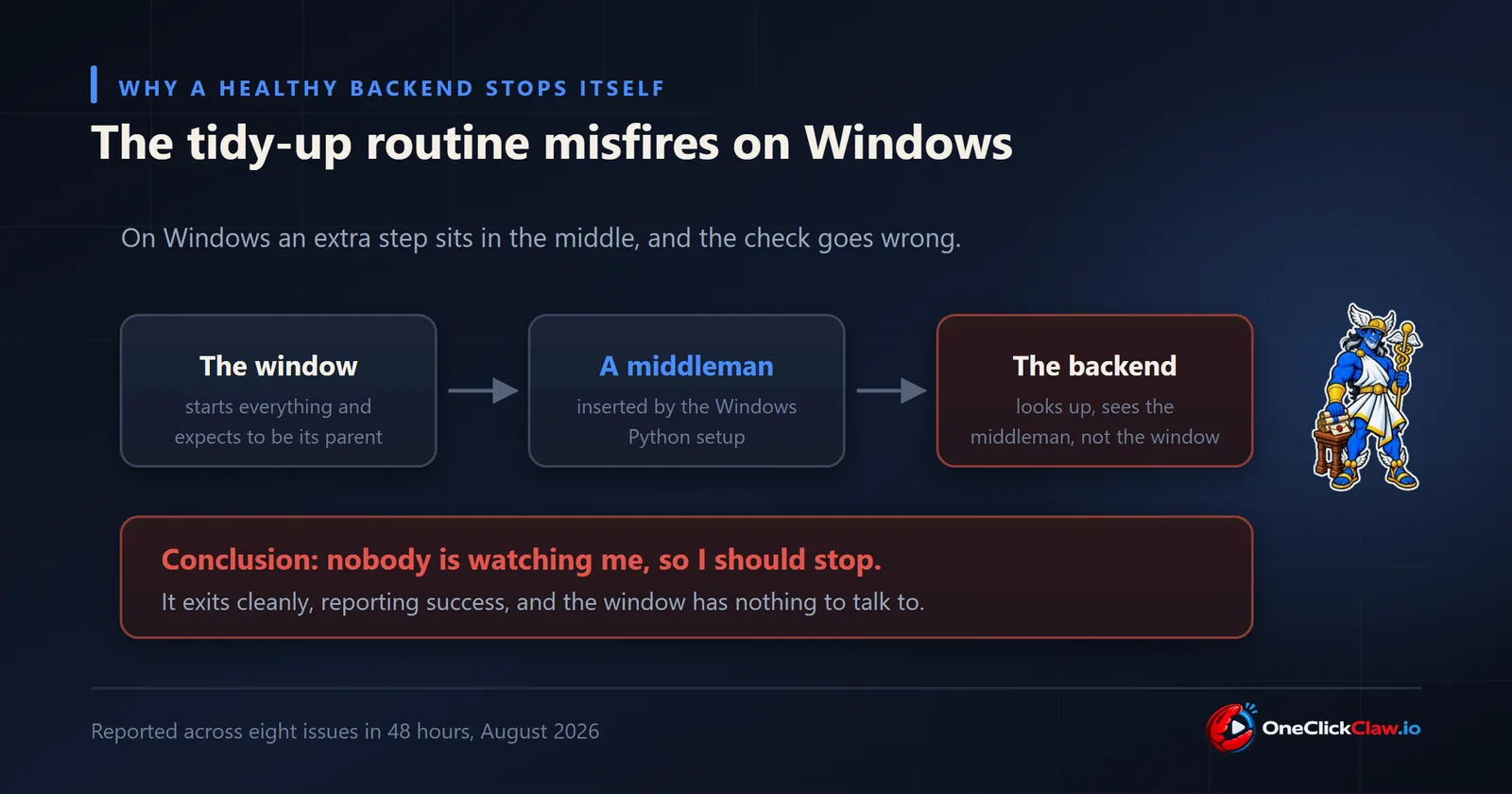
Hermes has an internal tidy-up routine whose job is to shut down abandoned backends, the ones left behind when the window closes unexpectedly. It decides a backend has been abandoned by checking who its parent program is.
On Windows that check can be wrong through no fault of yours. The way the Python environment is built there inserts a tiny middleman program between the window and the backend. The backend looks up, sees the middleman instead of the window, concludes it has been abandoned, and shuts itself down cleanly. Exit code zero, on the very first check, every single time.
This was a recent change rather than a long-standing flaw. It produced at least eight separate reports in forty eight hours in mid August 2026, including issue 83548 and issue 83562, almost all of them on Windows.
The test that confirms it in thirty seconds
Close Hermes Desktop. Open a terminal and start the backend by hand:
hermes serveIf that runs happily and stays up while Desktop cannot start it, you have this exact problem. The backend is fine. Only the window's way of starting it is affected.
Being honest about where this stands: at the time of writing the repair for it was still landing in the development branch and had not appeared in a tagged release, and several community attempts at fixing it were closed without being merged. So the practical answer today is to start the backend yourself and leave it running, then open Desktop so it connects to the one that is already there.
If the number is anything other than zero
Now the backend really did fail, and the usual reason is a damaged installation after an interrupted update.
On Windows an update cannot replace files that are currently in use. If Hermes was still running when you pressed Update, the installer may have stopped part way and left the internal Python environment missing pieces, so the backend now dies immediately on startup. One report describes exactly this, with a core web component left missing, in issue 83211.
The distinguishing signs are simple. The trouble began right after an update, the number is not zero, and the log shows a complaint about something missing rather than a clean exit.
Two more causes worth knowing, both with a clear tell:
- A separate Python already on your system taking over. If you had Python installed before Hermes, an older or broken copy of the Hermes command can win over the app's own private one, producing exit code one and a restart loop. Reported in issue 40702. The documented lever here is
HERMES_DESKTOP_IGNORE_EXISTING=1, which tells Desktop to stop looking for a Hermes on your system path and use only its own. - A non-English Windows. Systems whose default text encoding is not the international standard have produced a distinctive crash loop with flashing console windows. The project describes a broad hardening pass covering this class of fault in the notes for v2026.8.3, so updating is the answer.
Before you press Update again
This is the one habit that prevents the worst version of this problem. Quit Hermes completely first, including anything running in the background, and only then update. An update applied over a running installation is how the damaged environment happens in the first place, and repairing one is considerably more work than avoiding it.
Where to look
On Windows your logs are at %LOCALAPPDATA%\hermes\logs\, and on macOS or Linux at ~/.hermes/logs/. The two files worth opening are desktop.log and errors.log.
You are looking for one thing: whether the backend ever announced itself before it stopped. If it did and the code is zero, you are in the watchdog case above. If it never got that far and the log names something missing, you are in the damaged installation case.
Why this whole family of problems exists
Step back from the specific message for a second, because the pattern matters more than the fix.
Every failure above lives in the same place: the desktop app on your own computer, trying to start and reach a second program on that same computer. Your antivirus, your PATH, your Python installs, your disk speed, whether the machine just woke up. None of that has anything to do with your agent doing useful work, and all of it can stop it starting.
An agent that lives on a server you never turn off skips this entire category. There is no desktop shell to boot, no local handshake to time out, and no laptop lid to close in the middle of a job. It starts once and stays up.
That is what we do at OneClickClaw. Today you can put an OpenClaw agent on a dedicated European server of your own, set up for you, from EUR 14.99 a month, with 7 days free and just an email to start. Hermes Agent hosting is on the way, so if you are here for Hermes, the OpenClaw side will show you exactly how the managed version feels while you wait.
Frequently asked questions
- Why does exit code 0 matter so much here?
- Zero is the code a program reports when it shuts down deliberately and successfully. A crash, a missing component or a forced kill all produce other numbers. So a zero tells you the backend was working and chose to stop, which points at an internal tidy-up routine rather than at anything wrong with your setup.
- The backend runs fine when I start it myself. Why can the app not do it?
- That is the clearest sign of the Windows watchdog case. The backend is healthy either way, but when the app starts it, an extra middleman program sits in between and the backend misreads that as having been abandoned, so it shuts itself down. Starting it yourself removes the middleman.
- My number is not zero. Is it the same problem?
- No, and this is why the number matters. Any non-zero code means the backend genuinely failed rather than stopping on purpose. The most common reason is an update that was applied while Hermes was still running and left the installation incomplete.
Related guides
- How to Fix "Timed out connecting to Hermes backend after 15000ms"The 15000ms timeout is a single slow answer from a healthy local backend, not a broken agent or a bad API key. Running the terminal version once warms the cache and clears it in most cases, and the underlying stall was repaired upstream in release v2026.7.1.
- How to Fix "Could not connect to Hermes gateway"Two separate parts of Hermes are both called the gateway, which is why the obvious command does not help. The desktop needs the backend server on port 9119, and the fastest test is to start it by hand and let the app attach to it.
- OpenClaw 2026.8.1 to 2026.9.2 Upgrade Crash Loop: The Fix OrderTwelve upgrade reports were filed against OpenClaw 2026.8.1 and against the 2026.9.1 to 2026.9.2 path between August 31 and September 7, 2026. This page groups them by symptom, quotes the command each reporter used, and gives the order that avoids discovering the blockers one restart at a time.
- Hermes Install Fails on Ubuntu 24.04: The Fix OrderThree open Ubuntu reports (issues 88529, 89343, 87460) describe silent install.sh failures. The fixes: install the official prerequisites plus libatomic1 before the script, give the Chrome for Testing download real time, then hermes doctor.