
Put a Dollar Cap on Hermes so an Unattended Job Can't Run Up the Bill
Leave Hermes working overnight and wake up to a bill you did not plan for. A free plugin called budget-leash puts a dollar limit on it. A beginner guide with a screenshot for every step: what the limit does, what it costs and where you set it.

What the dollar cap does, in plain words
Think of a prepaid phone card. When the credit runs out, the calls stop, and no surprise bill arrives at the end of the month. budget-leash gives Hermes the same kind of card.
- It counts what each job spends on the AI model, and how many actions it takes.
- At 80 percent of your limit, it tells Hermes to finish up.
- At 100 percent, Hermes stops: no new action, no new call to the AI model.
- Hermes can still send you one last message saying why it stopped.
The plugin is listed in the official Hermes Marketplace, made by GitHub user jusst01. We read its page on 14 November 2026.
What it costs
If you use your own AI key, you pay the AI provider directly, as before. The plugin's numbers are an estimate: it guesses the price from a table you can edit. The real amount is always the one on your AI provider's invoice, so keep your provider's own spending limit switched on as well.
Before you start
- Hermes Agent version 0.22.0 or newer, the one that runs your overnight jobs.
- A daily amount you are happy to spend, for example 5 dollars.
Step by step: set the cap
Step 1. Open the terminal of your Hermes server and type hermes plugins install budget-leash. Hermes downloads the plugin and asks "Enable 'budget-leash' now?". Type y and press Enter.
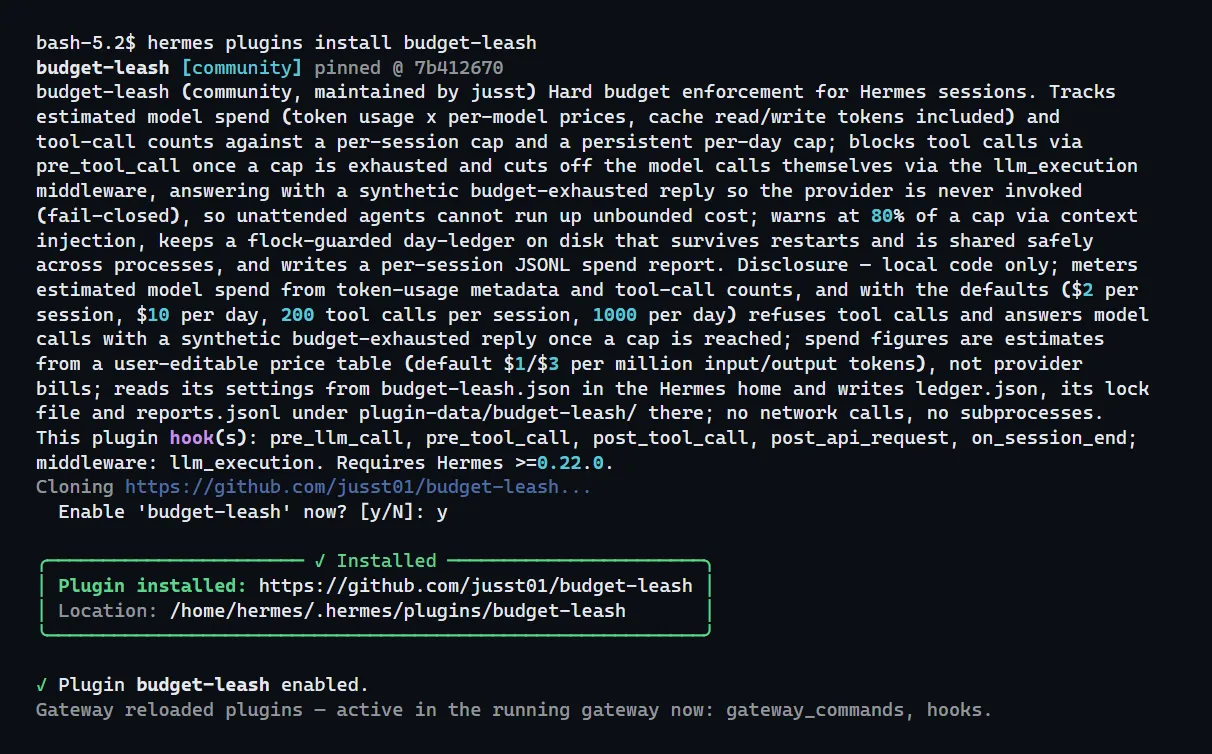
Step 2. If you answered no by mistake, type hermes plugins enable budget-leash.

Step 3. Write your own limits in the plugin's settings file, budget-leash.json, inside the hidden .hermes folder of your server. Ours says 1 dollar per job and 5 dollars per day. Change the two numbers to yours and save.

Step 4. Restart Hermes with hermes gateway restart. This step matters: on our test server the plugin only read the new numbers after a restart.

Step 5. In your Hermes chat, type /leash report. The reply shows your limits. If it says 1.0 and 5.0, the cap is on.
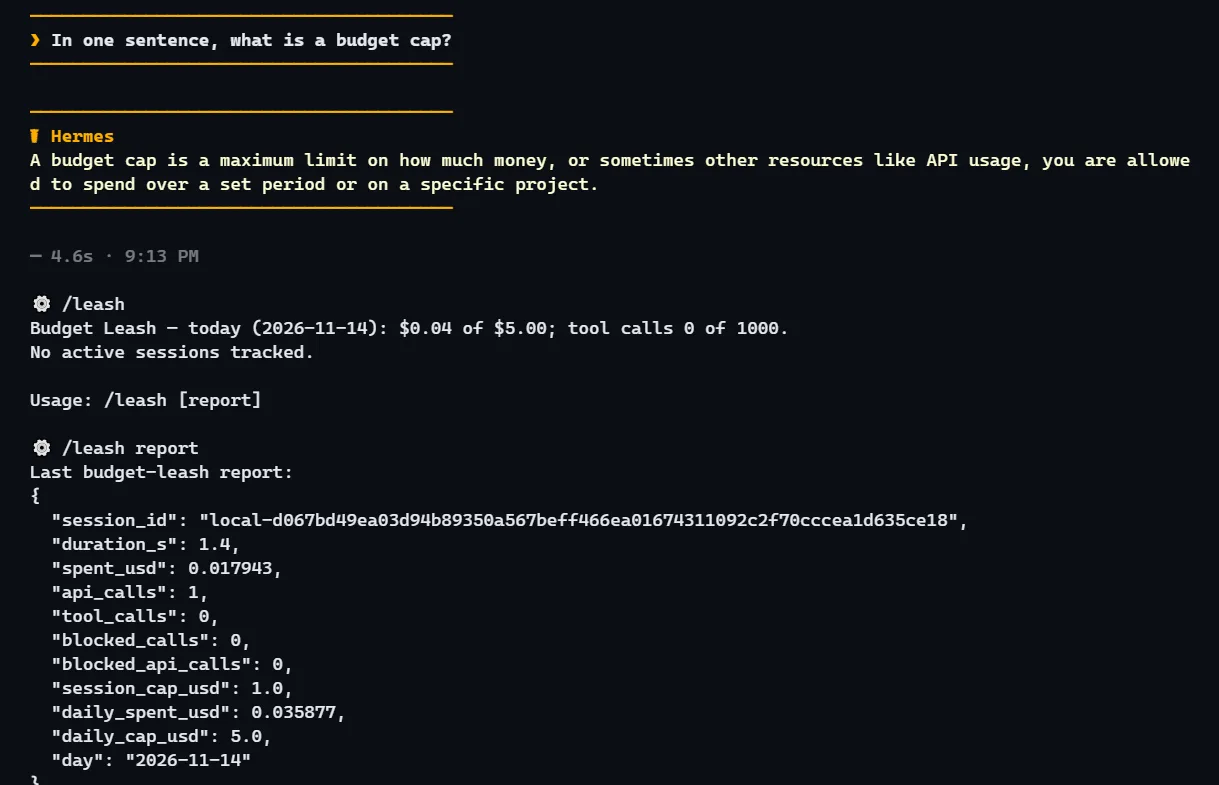
Important: a restart keeps the day's total. The plugin writes it to disk, so a job that restarts itself cannot start the day again from zero. Each Hermes profile keeps its own total. To check the cap before a real overnight job, run a short job while you watch /leash.
Frequently asked questions
- Will the number match my provider's invoice?
- Close, never exact. The plugin estimates. The invoice is the real bill.
- What happens when the cap is reached?
- Hermes stops taking actions and stops calling the AI model. It can still send you a short message explaining the stop.
- Does each Hermes profile have its own cap?
- Yes. Each profile keeps its own daily total.
- Who makes this plugin?
- GitHub user jusst01. It is listed in the official Hermes Marketplace.
Related guides
- OpenClaw Token Bill: Find the Leak and Cut CostsOpenClaw resends its instructions on every turn, so small habits add up. How to measure token use, move routine jobs to cheaper models or plain scripts, handle email, voice and photos locally, and set a hard spending stop, step by step.
- Give Each Job Its Own Hermes Profile so Work and Home Stay SeparateWhen one Hermes agent handles your job, a side project and family plans, their notes start to blend. This beginner guide sets up a separate agent for each job in five short steps, with a screenshot for every step.
- How to Install Hermes Agent and Start Your First ChatInstall Hermes Agent, connect a model, verify your first chat and add Telegram when you want to message it away from your computer.
- Ask Hermes for a Setup Check-Up Before It Changes AnythingAfter a few weeks of use, old memories and overlapping skills can leave Hermes feeling messy. This guide shows how to get a short report of what to clean up, approve each fix yourself and make new memory writes wait for your yes.