
Get a Real Phone Call from Your OpenClaw or Hermes Agent
Your agent can ring your Android phone when a job needs a yes, and you can call it back by voice. This guide follows the official agentring setup for OpenClaw and Hermes, including the free plan limits and the self-hosted option.
Your agent can ring your Android phone when a job needs a yes, and you can call it back by voice. This guide follows the official agentring setup for OpenClaw and Hermes, including the free plan limits and the self-hosted option.
You are away from the computer when a long job finishes, fails, or needs a yes or no. A chat message is easy to miss. A real incoming call gets your attention.
agentring is free to start and open source. It lets your OpenClaw or Hermes agent send you a message, wait for a reply, or ring your Android phone. There is no phone number and no Twilio account. A voice assistant on the call tells you what is going on, you answer out loud, and the agent gets a written transcript and carries on. This guide follows the official agentring pages for OpenClaw and Hermes, and the project homepage, all read on the 14th of November 2026.
This is different from talking to the agent by typing or by a dictation app on your PC. If you want that kind of voice typing, see Talk to Hermes and OpenClaw by Voice, Free, with FU Flow.
What you need
- An Android phone running Android 8 or newer. The official homepage says the app is on Google Play, and there is an APK if you do not use the Play Store. There is no iPhone app yet, and the homepage has a waitlist for the planned iOS app.
- An OpenClaw or Hermes Agent install you can configure yourself, on your own machine or on a hosted server.
- A few minutes, and a place to keep an API key private. The official OpenClaw and Hermes pages say you should run the connect command yourself, so the key never goes through the agent.
If your agent already runs on a OneClickClaw hosted server, with plans at oneclickclaw.io/plans, you still pair your own Android phone. The agent stays on that server. Only the call or the message reaches you.
What it costs
The official homepage describes two paths.
agentring cloud is the quick path: you install the app, sign in, scan a QR code, and add one address to your agent. The official OpenClaw page, read on the same day, states the free plan as 1 phone, 10 call minutes a month, and 100 messages a day, with no card. The homepage also lists a paid Pro plan at $12 a month plus tax. The homepage FAQ says new calls or messages are refused until the limit resets (call minutes monthly, messages at midnight UTC), and that a call in progress ends when the month's minutes run out. The agent then gets a clear error so it can fall back to something else.
Self-hosting uses the same open source software. The homepage says it is free and unlimited, and that everything stays on your machines, but you run a server (or your own computer with Docker), create a Firebase project, and bring a voice AI key. The official steps are on the self-hosting guide. You can move from the cloud path to your own server later by pairing the phone with the other server.
Step 1. Install the Android app and pair the phone
The official homepage lists three steps for the cloud path, and says they take about five minutes.
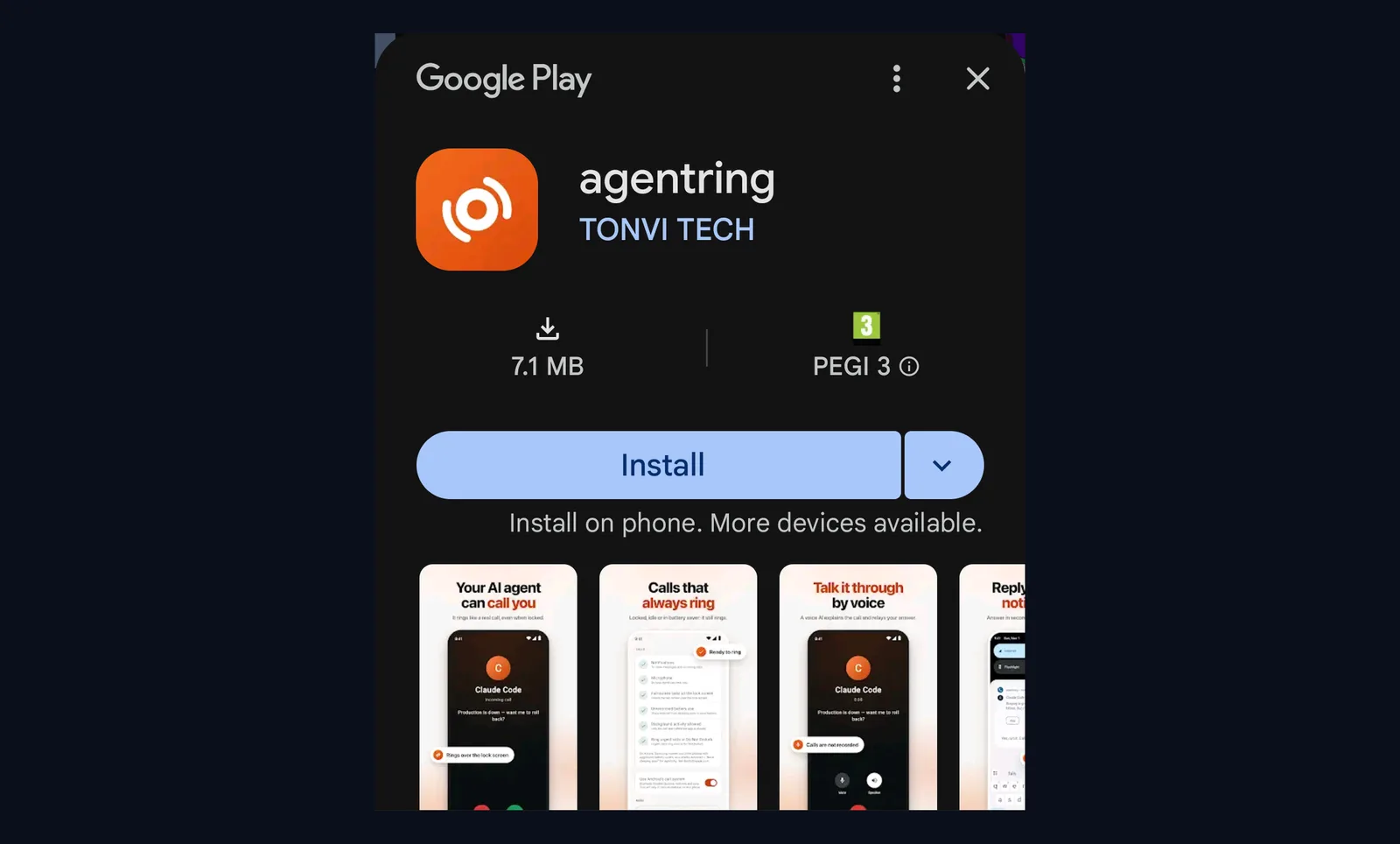
Step 1. Install the Android app from Google Play, or download the APK if you do not use the Play Store. The homepage says the app uses Android's own call screen, so it can ring through a locked screen.
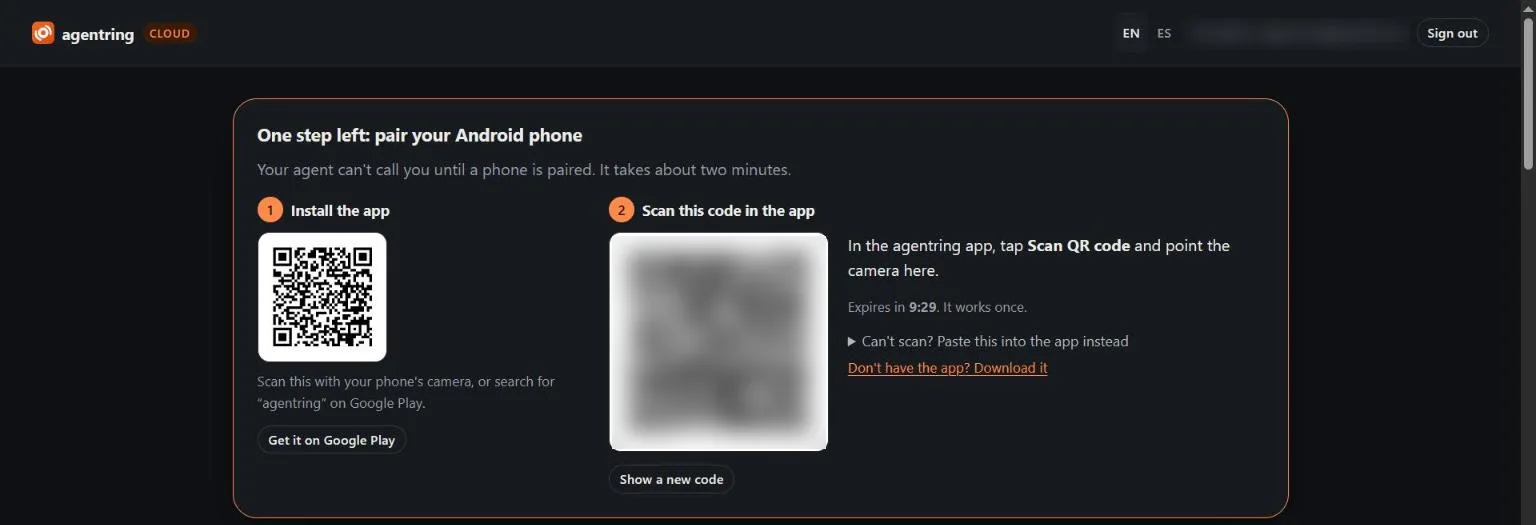
Step 2. Sign in on the web with the email link the site sends you. The official page says there is no password. Your dashboard shows a QR code. Scan it with the app so the phone is paired. The dashboard also shows your API key, which starts with ak_. Treat that key like a password. Write it down only in a private place.
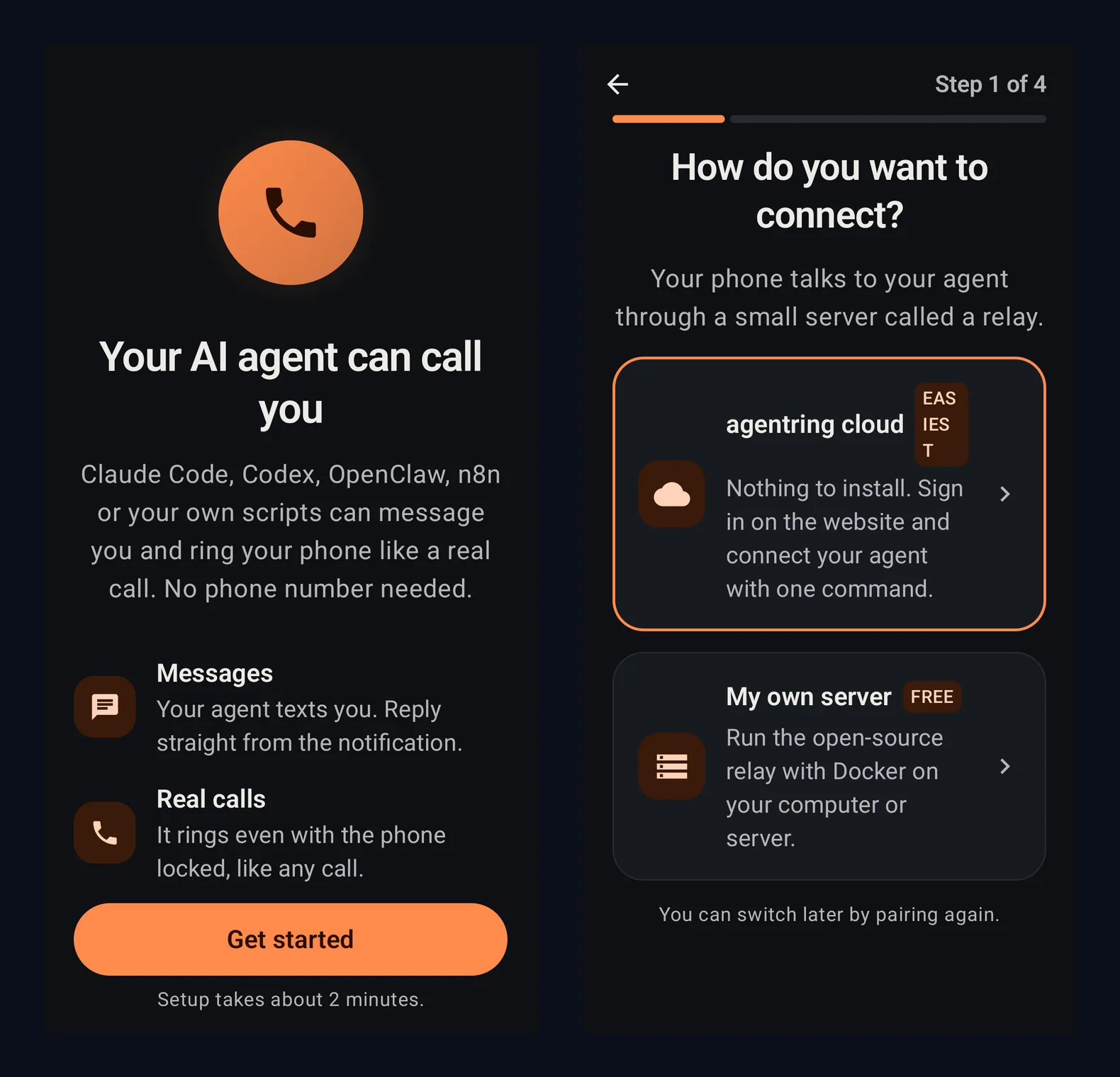
Here is what the app showed on our Android test phone on the 15th of November 2026. The first screen says "Your AI agent can call you" with a Get started button. Next it asks how you want to connect: pick agentring cloud for the quick path, or My own server if you self-host. The Pair your phone screen then lists the three steps on your computer, with a Scan QR code button. If the camera cannot read the code, tap "Can't scan? Paste the code". On the dashboard, open "Can't scan? Paste this into the app instead", press Copy, paste the code into the app, and tap Pair. The code works once and expires after a few minutes, so keep it private like the key.
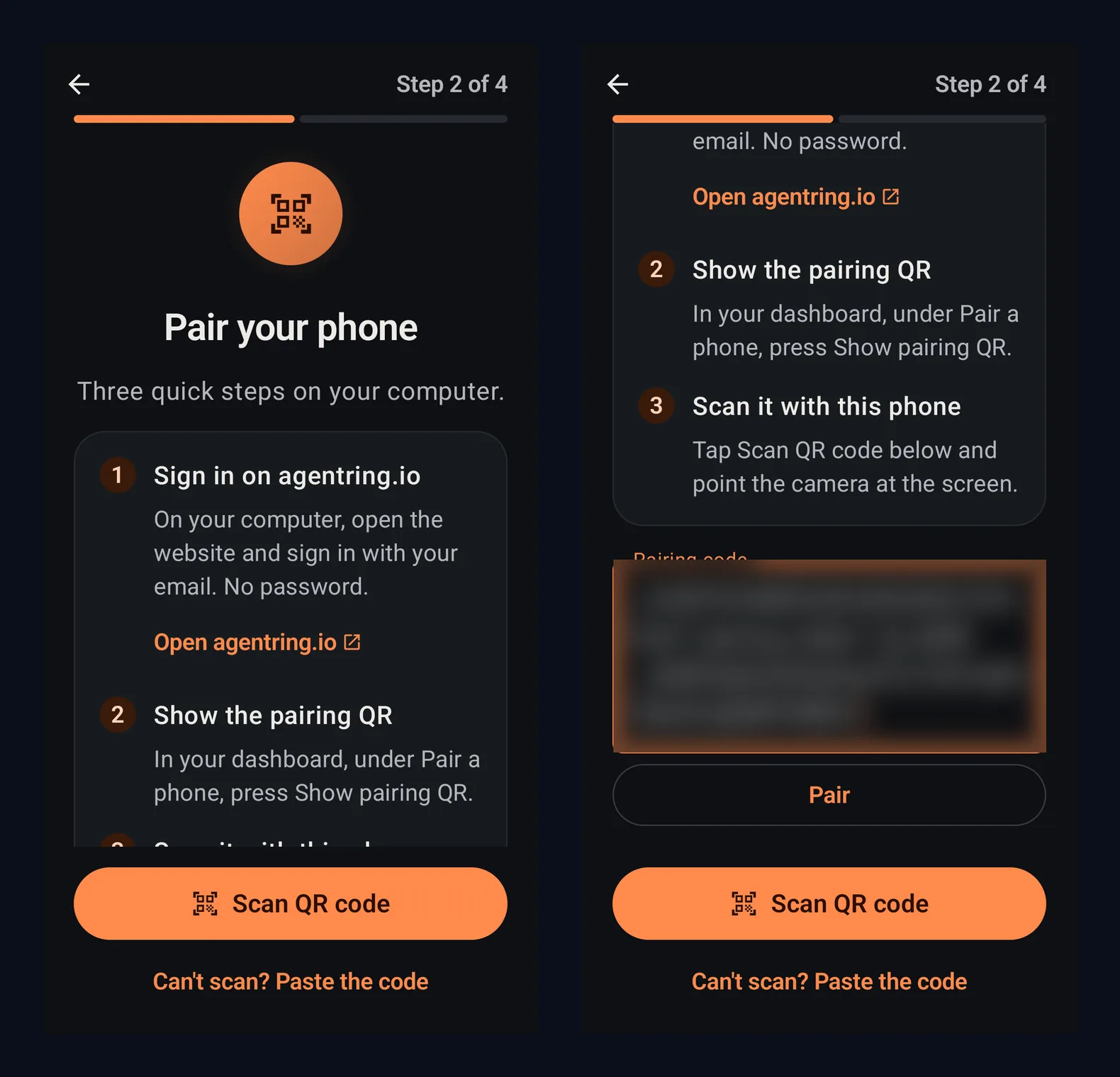
The app then opens a screen called "Make sure it rings". It asks you to allow notifications, the microphone, full-screen calls on the lock screen, and unrestricted battery use. On our phone the battery setting opened the phone's own battery page for agentring, where we chose No restrictions. When every item has a green tick, tap Continue. The last screen says "Paired with Your agent".
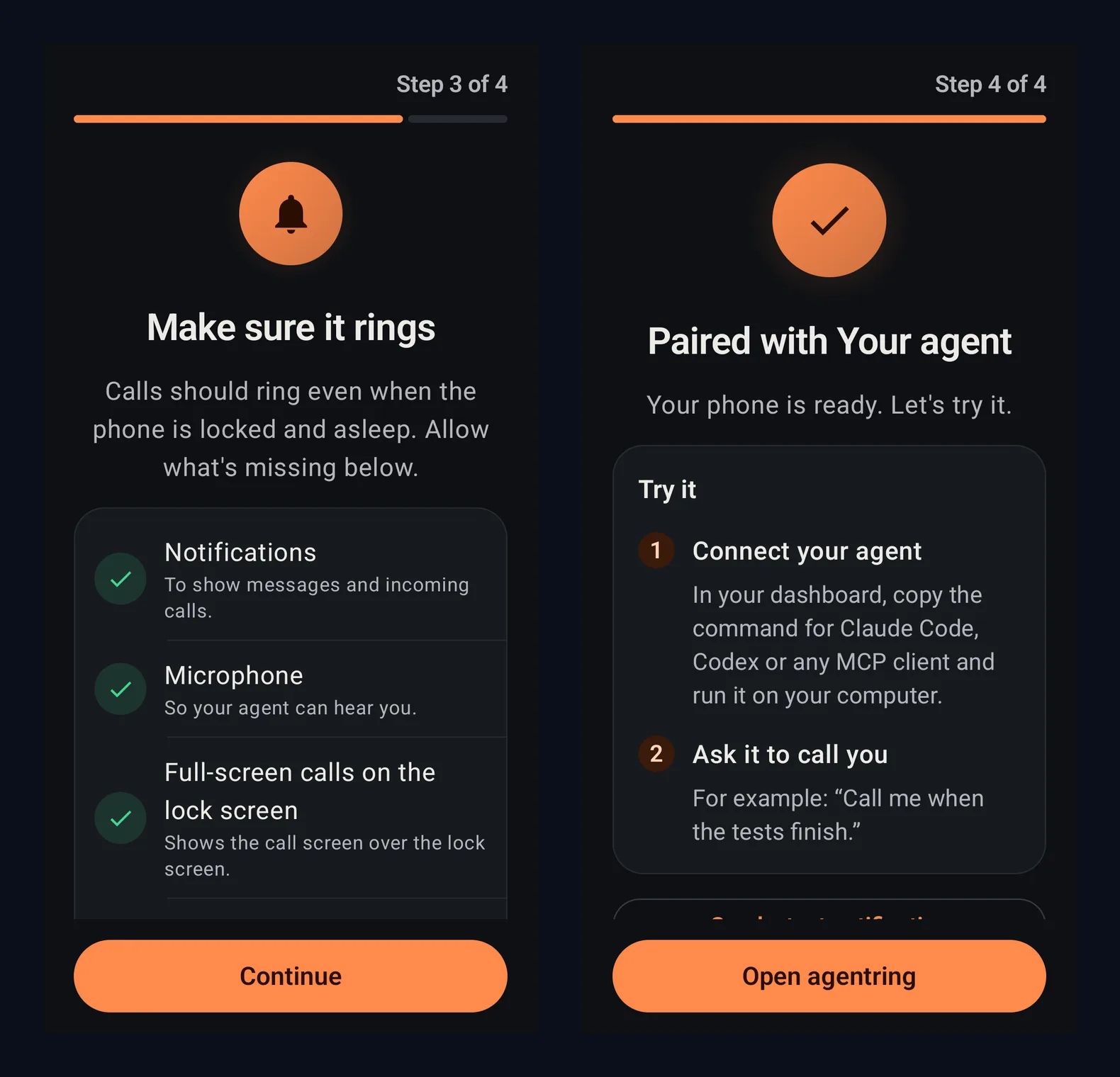
The official FAQ notes that some phone makers ship aggressive battery savers that can hold notifications back. If a locked phone does not ring, start there.
Step 2. Connect OpenClaw, if that is your agent
The official OpenClaw page shows a one-command connect for the cloud path. Run it yourself. Replace ak_… with the key from your dashboard:
uv tool install 'agentring @ git+https://github.com/mutonby/agentring#subdirectory=daemon'
AGENTRING_API_KEY=ak_… agentring connect openclaw --url https://agentring.io/mcp
The same page says this keeps the API key in ~/.openclaw/.env (the config only refers to it), sets a 30-minute tool timeout (OpenClaw's default is 60 seconds, which is shorter than a call), and installs the agentring skill.
If you prefer to do it by hand, the same page gives:
echo 'AGENTRING_API_KEY=ak_…' >> ~/.openclaw/.env
openclaw mcp set agentring '{"url":"https://agentring.io/mcp","transport":"streamable-http","headers":{"Authorization":"Bearer ${AGENTRING_API_KEY}"},"requestTimeoutMs":1800000}'
OpenClaw picks the server up on the next turn. Check it with:
openclaw mcp probe agentring
You can also start from the skill, then ask OpenClaw to set agentring up:
openclaw skills install @mutonby/agentring --global
Your agent then gets four tools, as listed on that page: send_message (a notification you can reply to), get_replies (your replies, waiting up to an hour if needed), call (the phone rings and the voice assistant talks with you), and status.
If you are on the self-hosted path instead, the same page says to install the daemon from a clone of the repo, run agentring init with your relay and key, run agentring pair, then agentring connect openclaw. Follow the self-hosting guide for the relay itself.
Step 3. Connect Hermes Agent, if that is your agent
The official Hermes page follows the same idea. Run the connect command yourself, and replace ak_… with your key:
uv tool install 'agentring @ git+https://github.com/mutonby/agentring#subdirectory=daemon'
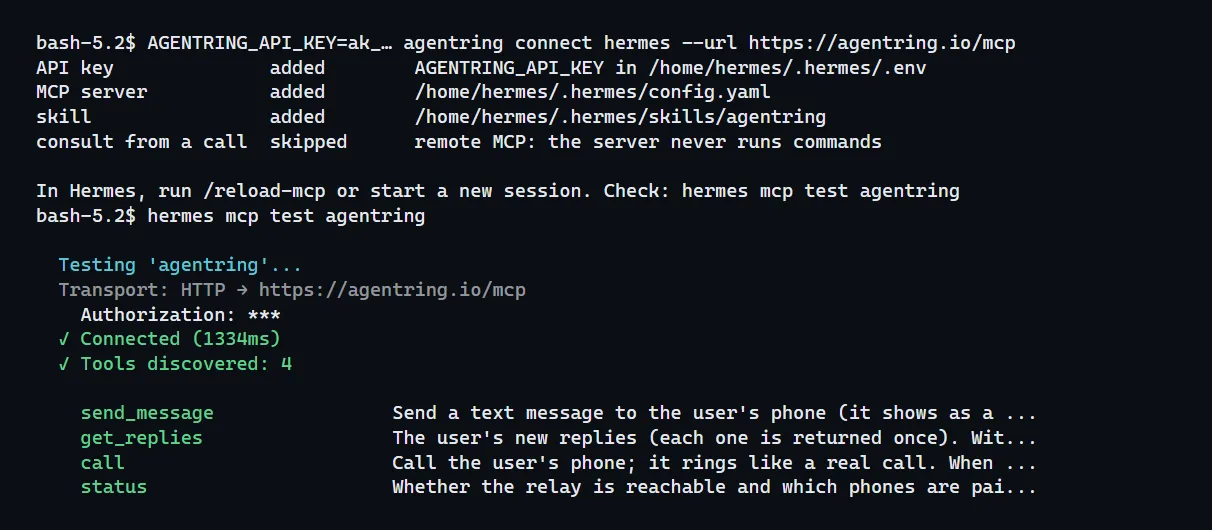
AGENTRING_API_KEY=ak_… agentring connect hermes --url https://agentring.io/mcp
The page says this keeps the API key in ~/.hermes/.env, sets a 30-minute tool timeout (Hermes' default is 5 minutes), and installs the agentring skill.
The first line uses uv, a tool that installs Python programs. On our test server (Hermes Agent 0.23.1, 14 November 2026) uv was missing at first, so the line failed with "uv: command not found". We installed uv from its official site, docs.astral.sh/uv, and the line then worked. The connect command printed that it added the API key, the MCP server and the skill, and hermes mcp test agentring answered "Connected" and "Tools discovered: 4", with the four tools listed below.
The same page also shows a by-hand setup: set AGENTRING_API_KEY with hermes config set AGENTRING_API_KEY ak_…, then add this to ~/.hermes/config.yaml:
mcp_servers:
  agentring:
    url: https://agentring.io/mcp
    headers: {Authorization: "Bearer ${AGENTRING_API_KEY}"}
    timeout: 1800
Then run /reload-mcp or start a new session. Check it with:
hermes mcp test agentring
You can also start from the skill, then ask Hermes to set agentring up:
hermes skills install mutonby/agentring/skills/agentring
The four tools are the same as for OpenClaw: send_message, get_replies, call, and status.
For a self-hosted Hermes setup, the same page says agentring connect hermes adds a local MCP server to ~/.hermes/config.yaml with a 30-minute timeout, because call waits until the call ends.
Step 4. Send a test message, then try one short call
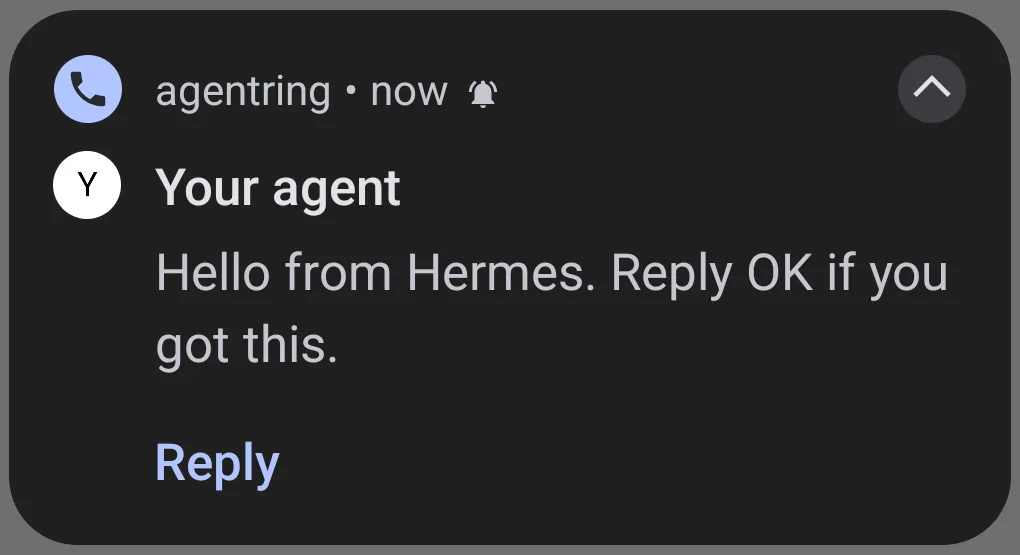
Ask your agent, in plain words, to send you a test message first. Reply from the notification so you know send_message and get_replies work.
Then ask it to call you with a short question that needs a yes or no, for example: "Call me and ask if I want you to keep going." Pick up, answer, and hang up. The official pages say the agent receives a transcript and carries on.
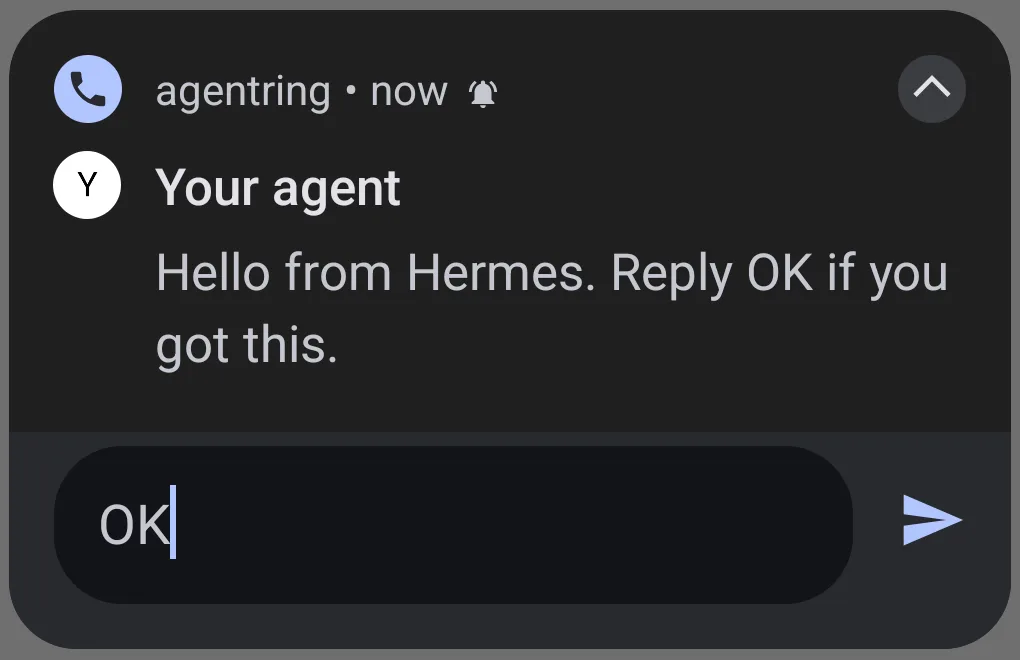
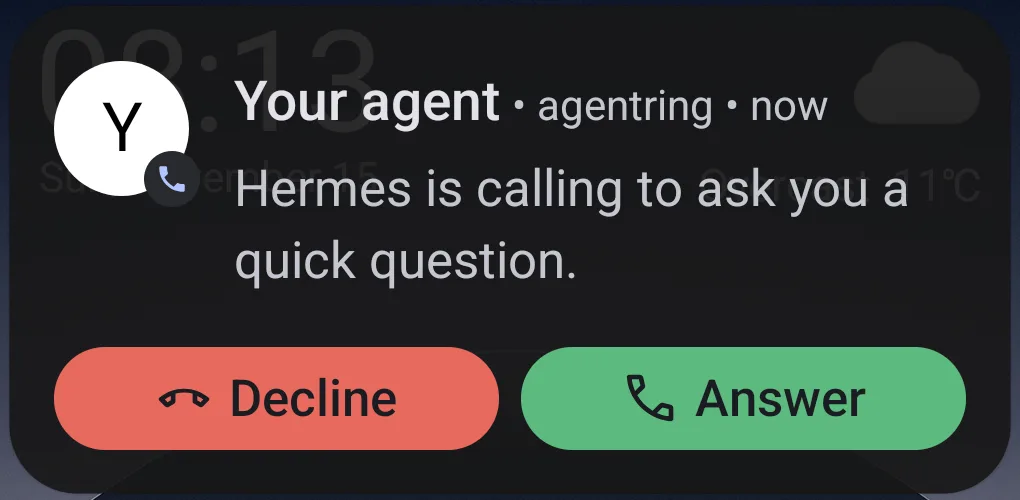
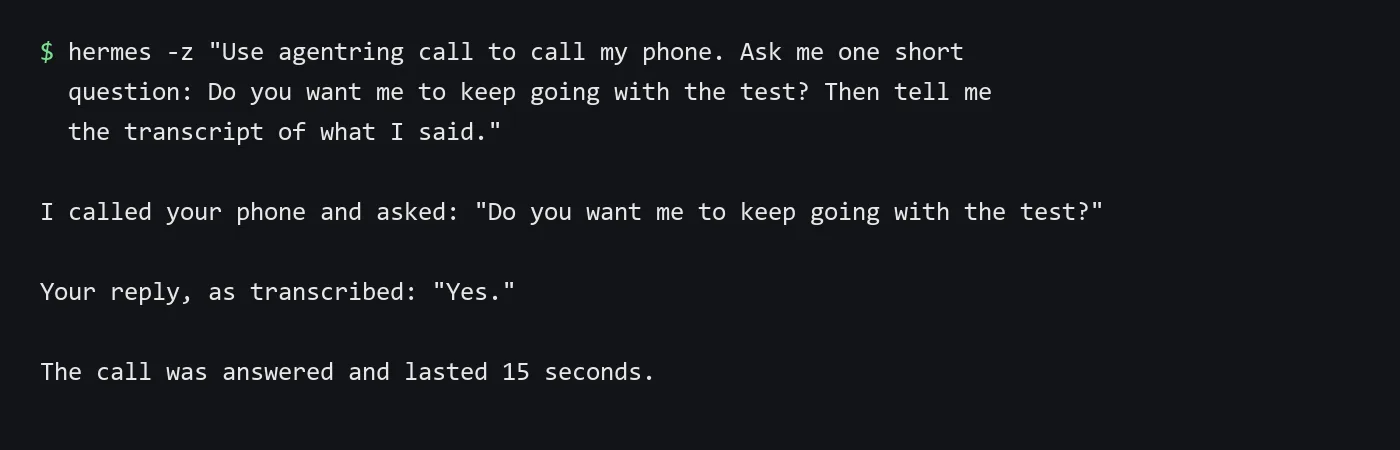
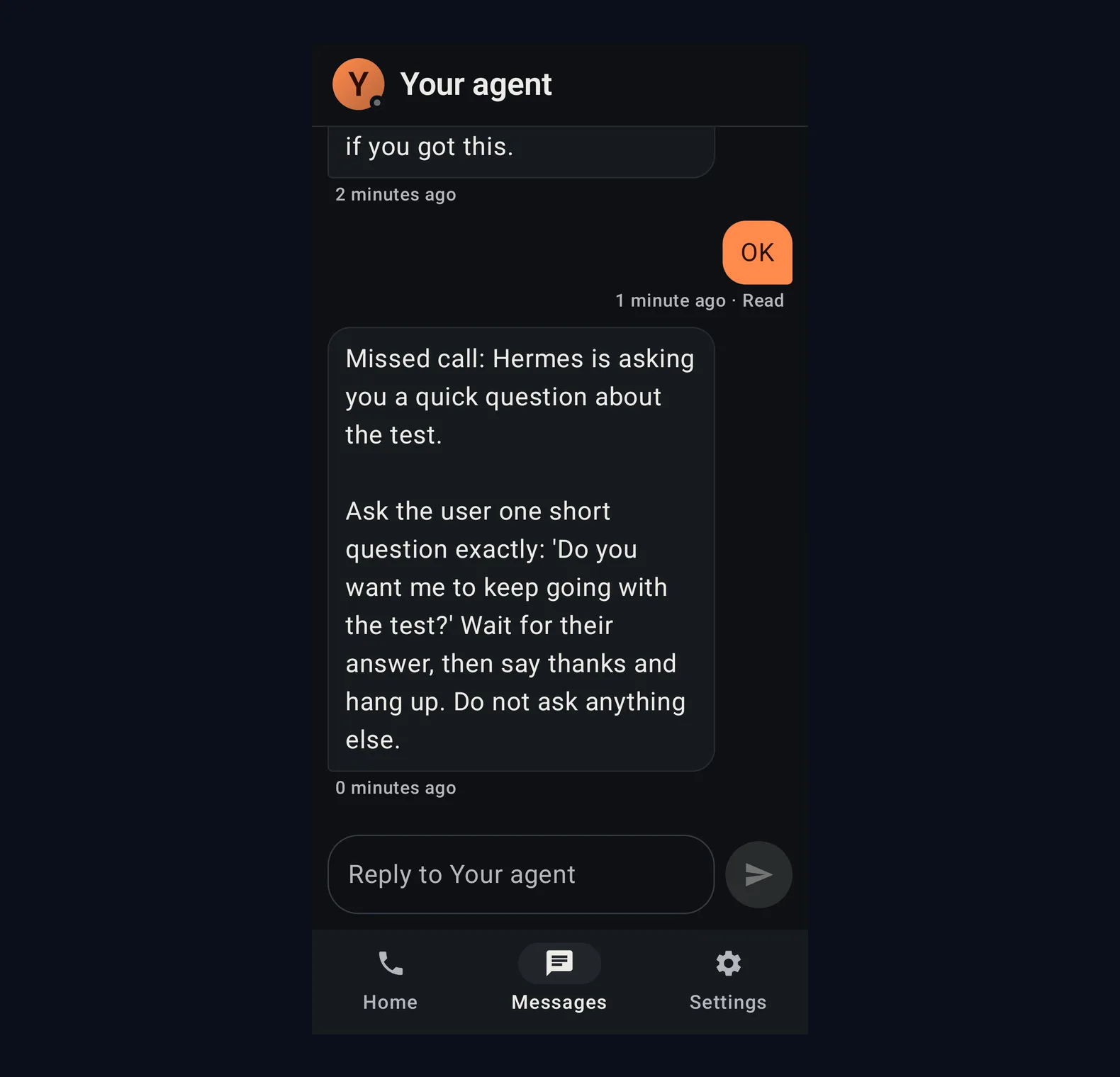
On our test server we asked Hermes, in plain words, to send a test message with agentring. A notification from "Your agent" arrived within seconds, with a Reply button. We answered OK from the notification, and when we asked Hermes to check, it said we had replied "OK". Then we asked Hermes to call. The phone showed "Hermes is calling to ask you a quick question" with Answer and Decline buttons. We answered, said yes, and Hermes reported the transcript "Yes." and a call of 15 seconds. On an earlier try nobody picked up. After about 30 seconds of ringing the call ended, and the question arrived in the app's Messages tab as a "Missed call" message. Phone screenshots of the call itself came out black on our phone, so the guide shows the incoming call screen.
To call the agent from the phone, the official OpenClaw and Hermes pages say: tap Call agent in the app and ask by voice. The voice assistant asks your agents through consult_agent, and each agent listed in ~/.agentring/agents.yaml is a tool. Run agentring serve --ai on the machine where the agents live. Until that runs, the app's Home screen shows the agent as Offline and "The agent is offline" under Call Your agent. Messages and calls from the agent to you work without it.
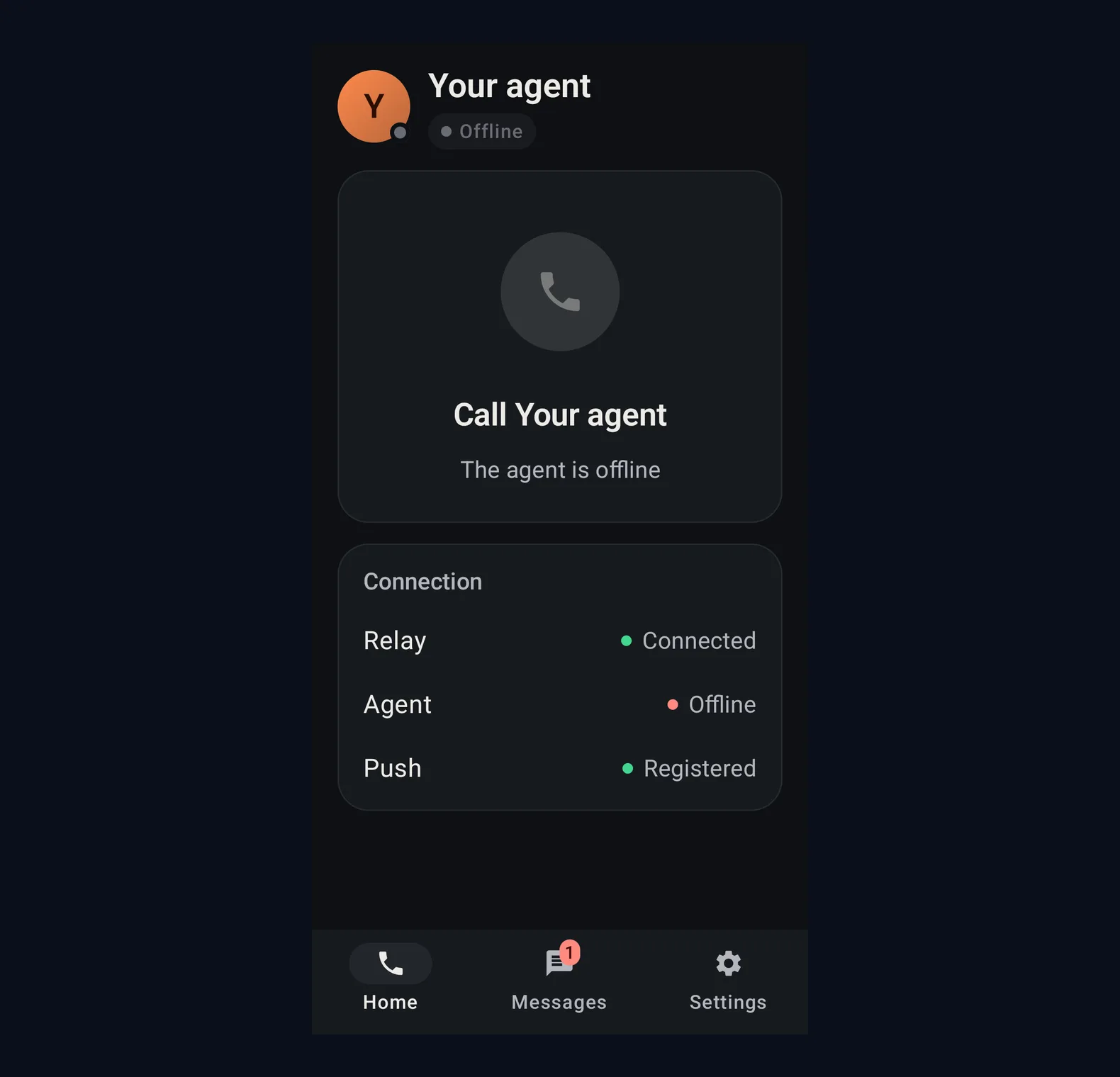
The official Hermes page gives this example for that file:
agents:
  hermes:
    description: My Hermes agent. Email, calendar, research.
    command: [hermes, -z, "Task: {task}"]
-z prints only the final answer. The same page says: do not add --yolo for the phone, because the voice assistant acts on what it hears.
The official OpenClaw page gives a matching example that uses openclaw agent with a per-call session id, so a second question on the same call keeps the context of the first. You can try a question without a call:
agentring agents ask hermes "…"
or the OpenClaw equivalent on that page. If the agent takes more than 20 seconds, the official pages say the call goes on and the answer arrives when it is ready, or as a message if you have already hung up.
The official Hermes FAQ adds: if you miss the call, it turns into a message you can reply to from the notification.
Step 5. Give the agent two safe everyday jobs
Start with jobs that should call you only when a person is needed. The official OpenClaw page gives examples such as: "When you finish the research, call me with a two-minute summary." The official Hermes page gives: "If my flight is delayed, call me."
Two patterns that stay within those ideas:
- "Call me when this job finishes or fails."
- "Call me if you need a yes before you go further."
Keep unattended work on a short leash. A call can wait for you, but it should not be allowed to act on everything it hears.
A Hermes-only alternative, with a paid app
A different Hermes catalog plugin, listed in the official marketplace as /call-me, also lets Hermes text and ring a phone. The marketplace page, read on the 14th of November 2026, says the plugin itself is free, and that the /call-me iPhone app needs a paid subscription. Traffic goes through the author's service. It is a Hermes-only path and a separate product from agentring. If you need iPhone and you accept a paid app, read that marketplace page before you install anything: call-me in the Hermes Marketplace. This guide does not walk through that paid app.
Quick answers
Does this work on iPhone?
Not with agentring, as of the pages read on the 14th of November 2026. The official site is Android only for now.
Do I have to pay?
The official cloud free plan is 1 phone, 10 call minutes a month, and 100 messages a day, with no card. Self-hosting is described as free and unlimited, with your own server, a Firebase project, and a voice AI key.
Should I paste the API key into the agent chat?
No. The official OpenClaw and Hermes pages say to run the connect command yourself, so the key never goes through the agent.
Can I call the agent, or does it only call me?
Both. The official pages say you can tap Call agent in the app and ask by voice, after the agent is listed in ~/.agentring/agents.yaml and agentring serve --ai is running on the machine where the agent lives.
Sources
- Official agentring homepage, https://agentring.io/, read on the 14th of November 2026
- Official OpenClaw setup, https://agentring.io/agents/openclaw, read the same day
- Official Hermes setup, https://agentring.io/agents/hermes, read the same day
- Official self-hosting guide, https://agentring.io/self-hosting, read the same day
- ClawHub skill page, https://clawhub.ai/mutonby/skills/agentring, read the same day
- GitHub repository, https://github.com/mutonby/agentring, confirmed the same day
- Official
/call-memarketplace page, https://hermes-agent.nousresearch.com/marketplace/call-me, read the same day, for the short alternative note only
Related guides
- Talk to Hermes and OpenClaw by Voice, Free, with FU FlowTalk to Hermes Agent and OpenClaw by voice with FU Flow, a free open source dictation app for your PC. Eleven steps, each with a screenshot.
- How to Install Hermes Agent and Start Your First ChatInstall Hermes Agent, connect a model, verify your first chat and add Telegram when you want to message it away from your computer.
- Update Hermes Agent to 0.23.1 so the plugin catalog works againSince the 9th of November 2026 Hermes Agent could hand you an old version of a plugin, or miss a new one. Version 0.23.1 fixes it. Nine steps with real screens from our own test server, where the update took about two minutes.
- Sign In to OpenClaw and Hermes Agent With Your Grok Subscription, No API KeyIf you already pay for SuperGrok, you do not need a separate xAI API key to run OpenClaw or Hermes Agent on Grok. Both agents have a built-in sign-in that uses your subscription. How to connect it on a server, what you get and what to do when xAI says no.