
Subscribe to our newsletter
One short email when we publish. No spam, unsubscribe anytime.
OpenClaw Server Requirements: the 500 MB Floor and the 4.2 GB Install
The OpenClaw documentation puts the absolute minimum for a self-hosted Gateway, the part of OpenClaw that stays running and connects the agent to chat apps, at 1 vCPU, 1 GB of RAM and about 500 MB of disk, according to the project's FAQ on providers, hardware and hosting, read on 18 September 2026.
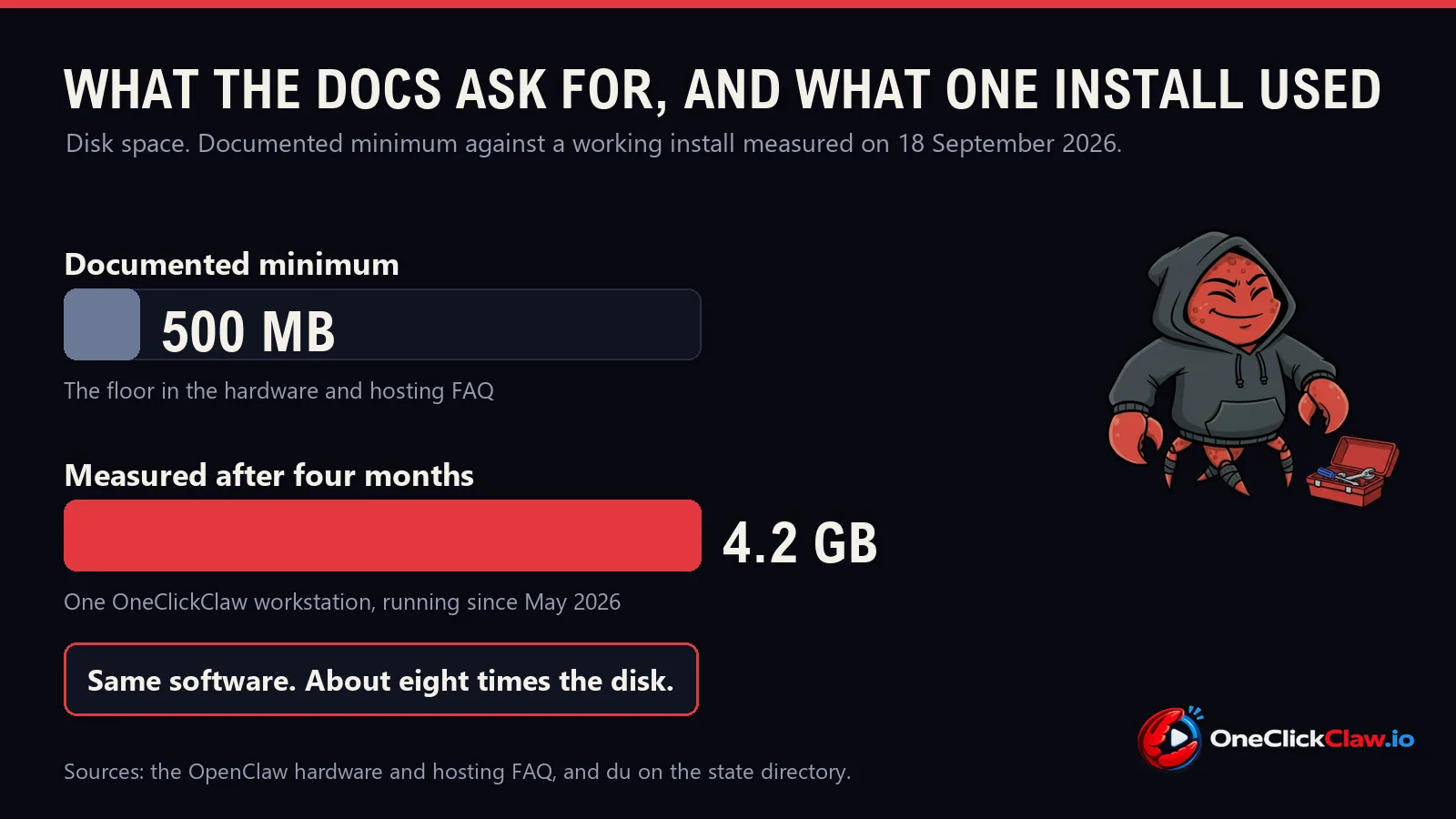
An OpenClaw install on a OneClickClaw workstation, running since May 2026, measured 4.2 GB of disk on 18 September 2026. The first figure starts the software. The second one is what four months of daily use looks like.
The short answer, for anyone sizing a machine today:
- Memory: 2 GB or more, the figure the documentation recommends.
- Disk: 16 GB or more, the figure the project's own Raspberry Pi page recommends.
- Node version: 24.16 or newer below 25, or 26.1 and newer, per the package metadata.
What the documentation asks for
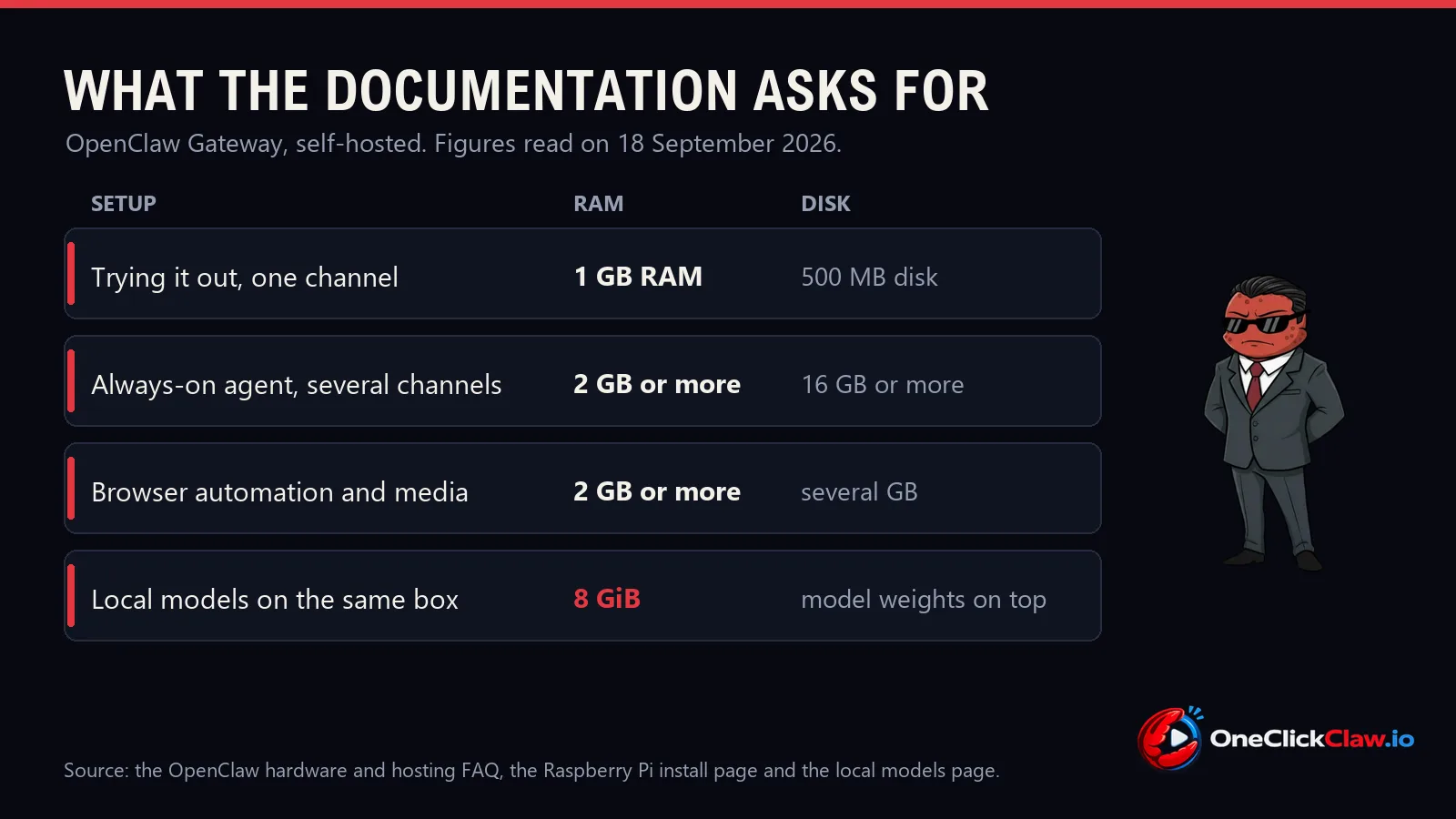
- Absolute minimum: 1 vCPU, one slice of a server's processor, with 1 GB of RAM, the working memory that empties on every restart, and about 500 MB of disk, per the hardware and hosting FAQ.
- Recommended: 1 to 2 vCPU and 2 GB of RAM or more, described on the same page as headroom for "logs, media, multiple channels".
- Virtual machines: the same floor, with 2 GB or more recommended for "multiple channels, browser automation, or media tools".
- Operating system: Ubuntu LTS or another modern Debian or Ubuntu, which the FAQ calls "the best-tested Linux install path". LTS means the version a project supports for years.
The same FAQ adds one warning in its own words: "Node tools and browser automation can be resource hungry". Browser automation is the agent opening a real web browser and clicking through a site.
Raspberry Pi: the documentation grades the boards
The Raspberry Pi install page repeats that floor, adds the storage figure the server answer leaves out, a 16 GB or larger card, and grades the boards.
| Board | How the page grades it |
|---|---|
| Pi 5, 4 GB or 8 GB | Best |
| Pi 4, 4 GB | Good |
| Pi 4, 2 GB | OK, once swap is added |
| Pi 4, 1 GB | Tight |
| Pi 3B+, 1 GB | Slow |
A 64-bit operating system is required. For boards at 2 GB and below, the page gives one documented remedy: a 2 GB swap file. Swap is disk space a machine borrows when memory runs out, and this setting tells Linux to lean on memory first and touch it only when it has to.
vm.swappiness=10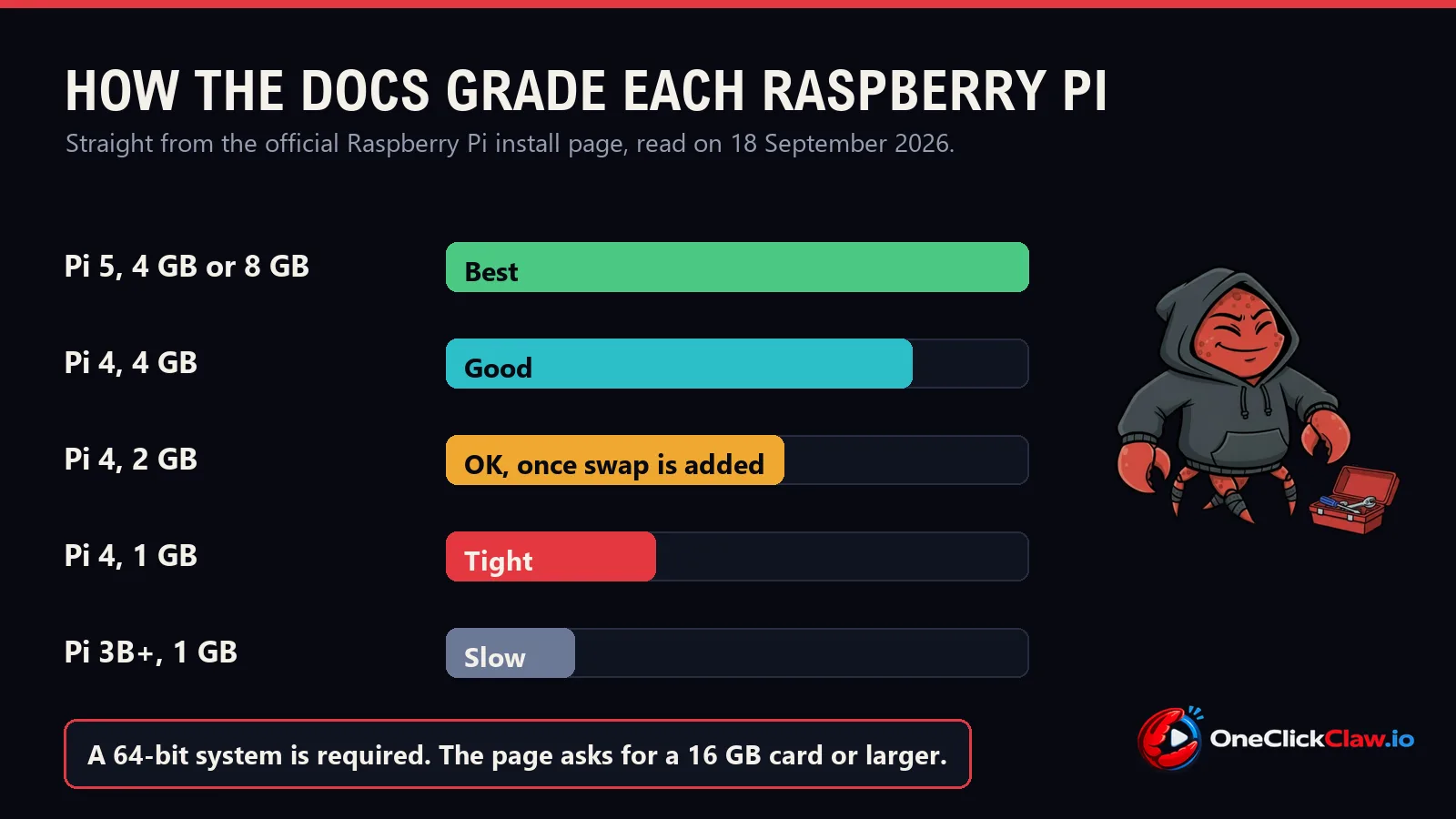
Disk: the number that grows
On npm, the public library Node software is published to, the openclaw package under the latest tag is version 2026.9.4, with an unpacked size of 200,760,485 bytes, about 200 MB, read on 18 September 2026.
The software alone therefore fills roughly 40 percent of the documented 500 MB before a single message has been handled. Four months of use looks different: the state folder of that workstation install measured 4,235 MB on 18 September 2026, counted with du, the standard Linux command for folder size, and it splits four ways.
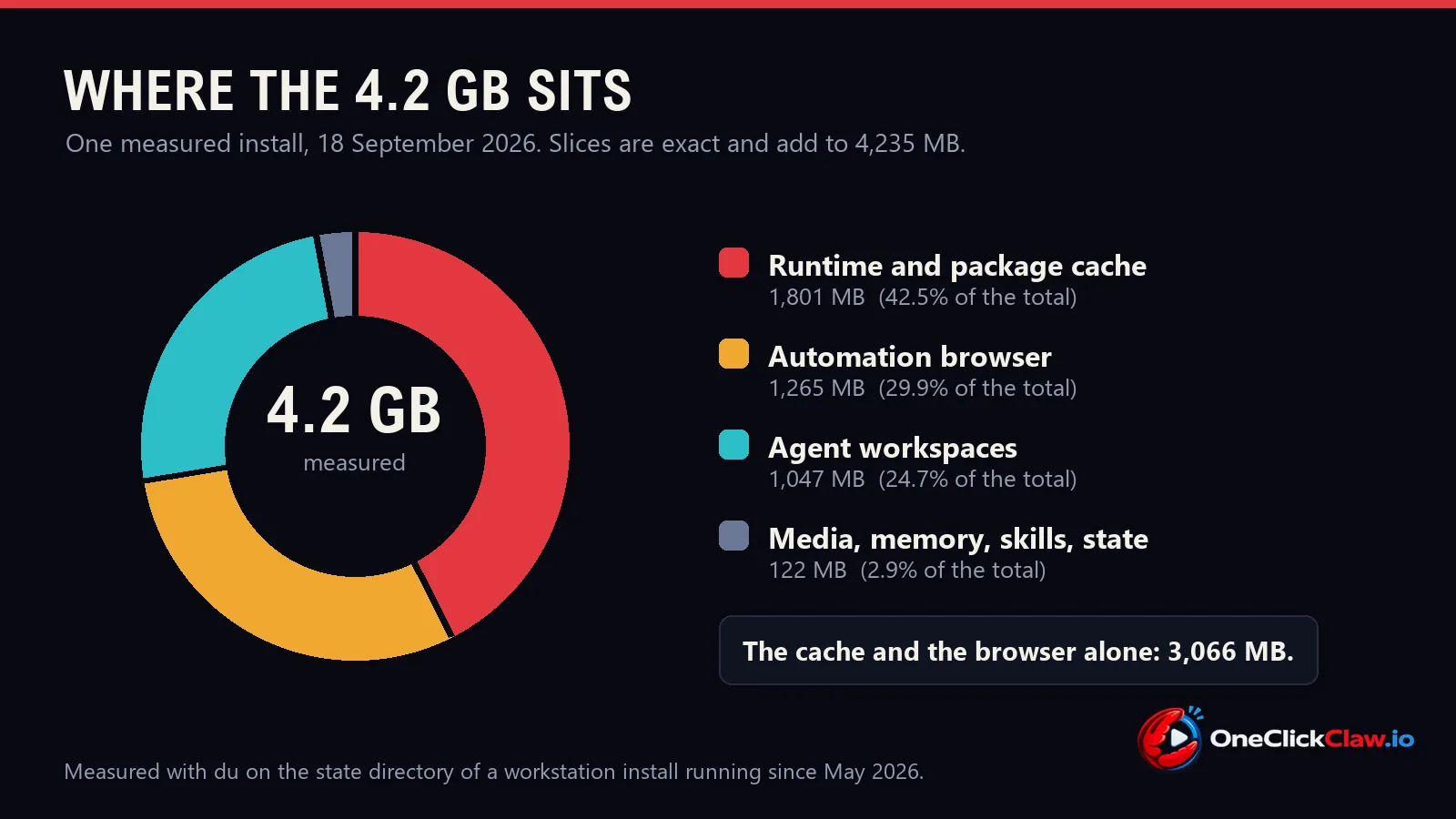
- 1,801 MB of runtime and package cache, the downloaded parts the software keeps so it starts quickly.
- 1,265 MB for the automation browser, the component the FAQ singles out as resource hungry.
- 1,047 MB of agent workspaces, which hold project files specific to that machine and generalise to nobody.
- 122 MB of media, cache, skills, memory and state together.
The two parts that any install accumulates, the cache and the browser, came to 3,066 MB between them. That is the distance between a documented floor of 500 MB and a machine that has been working for months.
For a server the practical reading is the Pi page's own figure: 16 GB or more, with extra room once browser automation and media are in daily use. The same pattern showed up on Hermes Agent server sizing, where a measured 884 MB of update leftovers made the point on a different runtime.
Node: check the version before choosing hardware
Node is the program that runs OpenClaw's code, the way a music player runs an audio file. The npm metadata for 2026.9.4 declares which versions the package accepts, read from the registry on 18 September 2026.
engines.node >=24.16.0 <25 || >=26.1.0In plain words: Node 24.16 or newer below version 25, or Node 26.1 and newer. Release 2026.9.3 raised that floor and added a startup check, covered in our report on the Node runtime check. An old Node on the server is a question to settle before the hardware is chosen.
The platform support page calls Node "the primary, default, and recommended runtime", with Bun 1.4 and above available as an explicit opt-in.
The same page lists where the Gateway is installed: a systemd user service on Linux and WSL2, a LaunchAgent on macOS and a Scheduled Task on Windows. Each one is that system's way of starting a program at boot and keeping it running.
Network: the docs keep it private by default
The FAQ's comparison of a laptop with a server lists "always-on, stable network, no laptop sleep issues" as the server's advantages. On a dedicated machine the documentation is measured: "Not required, but recommended for reliability and isolation."
The Linux server page adds the security default. The Gateway is meant to stay reachable only from the machine itself, then reached from outside through an encrypted tunnel, either SSH or Tailscale. Opening it wider requires a shared secret, a password the two sides agree on in advance. Our guide on locking down an OpenClaw install covers those checks.
Local models raise the floor to 8 GiB
A local model is the AI itself running on your own machine, with no outside service involved, and it changes the arithmetic. The local models page states that the managed setup checks available RAM, supported GPU memory and disk space before it starts, and that its curated recipes use a 64K context, meaning how much text the model holds in view at once.
In the page's own words, "the smallest has an 8 GiB host-memory floor, while larger recipes need more memory". GiB counts in 1,024s while GB counts in 1,000s, so that floor is about 8.6 GB, with the model files on disk on top. The page closes with a caution worth quoting in full: "These floors do not guarantee fit or speed."
Size it in one minute
- Decide where the model runs. A cloud model keeps the box at the documented 2 GB recommendation. A local model starts at the 8 GiB floor.
- Pick memory off the table. 1 GB is the documented minimum. 2 GB or more is the documented recommendation for several channels.
- Give it 16 GB of storage or more, the figure the project's own Raspberry Pi page recommends, so the cache and the browser have room.
- Check the Node version first. Node 24.16 or newer below 25, or 26.1 and newer.
- Put it somewhere that stays awake. The FAQ's own recommendation for round-the-clock reliability is a server.
Every OneClickClaw plan is sized against these figures from the start. Starter is 2 vCPU, 4 GB of RAM and 15 GB of NVMe storage at 14.99 euros a month, above the documented 2 GB recommendation. Hobbyist is 4 vCPU, 8 GB and 25 GB at 25.99 euros a month, matching the 8 GiB floor local models ask for. The 7-day free trial runs on a real dedicated Starter server and needs an email address, with no card.
Sources, all read on 18 September 2026: the OpenClaw FAQ on providers, hardware and hosting, the Raspberry Pi install page, the platform support page, the Linux server page, the local models page, the openclaw package metadata on the npm registry for version 2026.9.4, and a du measurement of a OneClickClaw workstation install running since May 2026.
Common questions
What are the minimum server requirements for OpenClaw?
The documentation gives an absolute minimum of 1 vCPU, 1 GB of RAM and about 500 MB of disk, and recommends 1 to 2 vCPU with 2 GB of RAM or more for headroom across logs, media and several channels. A vCPU is one slice of a server processor. Ubuntu LTS or another modern Debian or Ubuntu is described as the best-tested Linux install path.
How much disk space does OpenClaw really use?
The documented floor is about 500 MB, while the openclaw package alone unpacks to 200,760,485 bytes according to npm registry metadata read on 18 September 2026. On a OneClickClaw workstation install running since May 2026 the state folder measured 4,235 MB, of which 1,801 MB was downloaded runtime and package files, 1,265 MB the automation browser and 1,047 MB agent project files. The project's own Raspberry Pi page recommends 16 GB of storage or more.
Is 1 GB of RAM enough for OpenClaw?
One gigabyte is the documented absolute minimum for a rented server or a virtual machine, and the Raspberry Pi page grades a 1 GB board as Tight with swap and minimal configuration. Swap is disk space a machine borrows when memory runs out, and it is slower than memory. For an agent with several channels the documentation recommends 2 GB or more, and the same page notes that Node tools and browser automation can be resource hungry.
How much RAM do local models need on the same server?
A local model is the AI running on your own machine with no outside service involved. The local models page states that the smallest curated recipe has an 8 GiB host-memory floor, with larger recipes needing more, and that those recipes use a 64K context. GiB counts in 1,024s, so 8 GiB is about 8.6 GB. The same page adds that these floors do not guarantee fit or speed, so the model still has to be tested on the machine.
Which Node version does OpenClaw require?
Node is the program that runs OpenClaw's code. The npm metadata for version 2026.9.4 accepts Node 24.16 or newer below version 25, or Node 26.1 and newer, read on 18 September 2026. The platform support page describes Node as the primary, default and recommended runtime, with Bun 1.4 and above available as an explicit opt-in.
Can OpenClaw run on a Raspberry Pi?
The official install page covers it and grades the boards: a Pi 5 with 4 or 8 GB is marked Best, a Pi 4 with 4 GB Good, a Pi 4 with 2 GB OK once swap is added, a Pi 4 with 1 GB Tight and a Pi 3B+ with 1 GB Slow. A 64-bit operating system is required, and the page recommends a 16 GB or larger card or a USB SSD.
Source: docs.openclaw.ai
Helpful documentation
Want your own AI agent running without the setup? We host it on a dedicated EU server. Free for 7 days, no credit card.
Start your free trialGet notified when we publish new articles
No spam, unsubscribe anytime.
By subscribing, you agree to our Privacy Policy.