
Subscribe to our newsletter
One short email when we publish. No spam, unsubscribe anytime.
Hermes Agent's new Camofox browser looks human
Hermes Agent can now browse the web through a browser that presents itself like an everyday Firefox. On the 23rd of October 2026 Nous Research, the company behind Hermes Agent, added Camofox to its official plugin catalog, marked "Official", free, and released under the open MIT licence. The browser runs on your own machine, so the pages your agent visits never pass through a third-party cloud.
A plugin is an add-on: a small extra piece you switch on when you want your agent to do one more kind of job. This one gives Hermes eleven browser tools. It can open a page, read it, click, type, scroll, go back, press keys, list the images, take a screenshot that your vision model describes, and load saved logins.
Why a browser that looks human matters
Many websites check whether the visitor is a person or a program. They read small details the browser gives away, such as which graphics card it reports, which languages it prefers and how large the screen is. Together those details are called a fingerprint, like the pattern on a fingertip. A browser driven by software often leaves a fingerprint that gives it away, and the site answers with a puzzle, an empty page or a block.
Camofox is built on Camoufox, a version of Firefox that changes those details deep inside the browser's own engine, according to the project's page on GitHub. The browser server comes from Jo, the team behind a personal AI agent of the same name. On the 25th of October 2026 the project had 11,917 stars on GitHub, the bookmarks developers give to projects they follow.
For the reader, that means an agent that can finish ordinary tasks on ordinary websites: reading a price, checking an opening time, filling a form you asked it to fill. The terms of use of each website still apply to anything an agent does there.
What OneClickClaw saw on its own machine
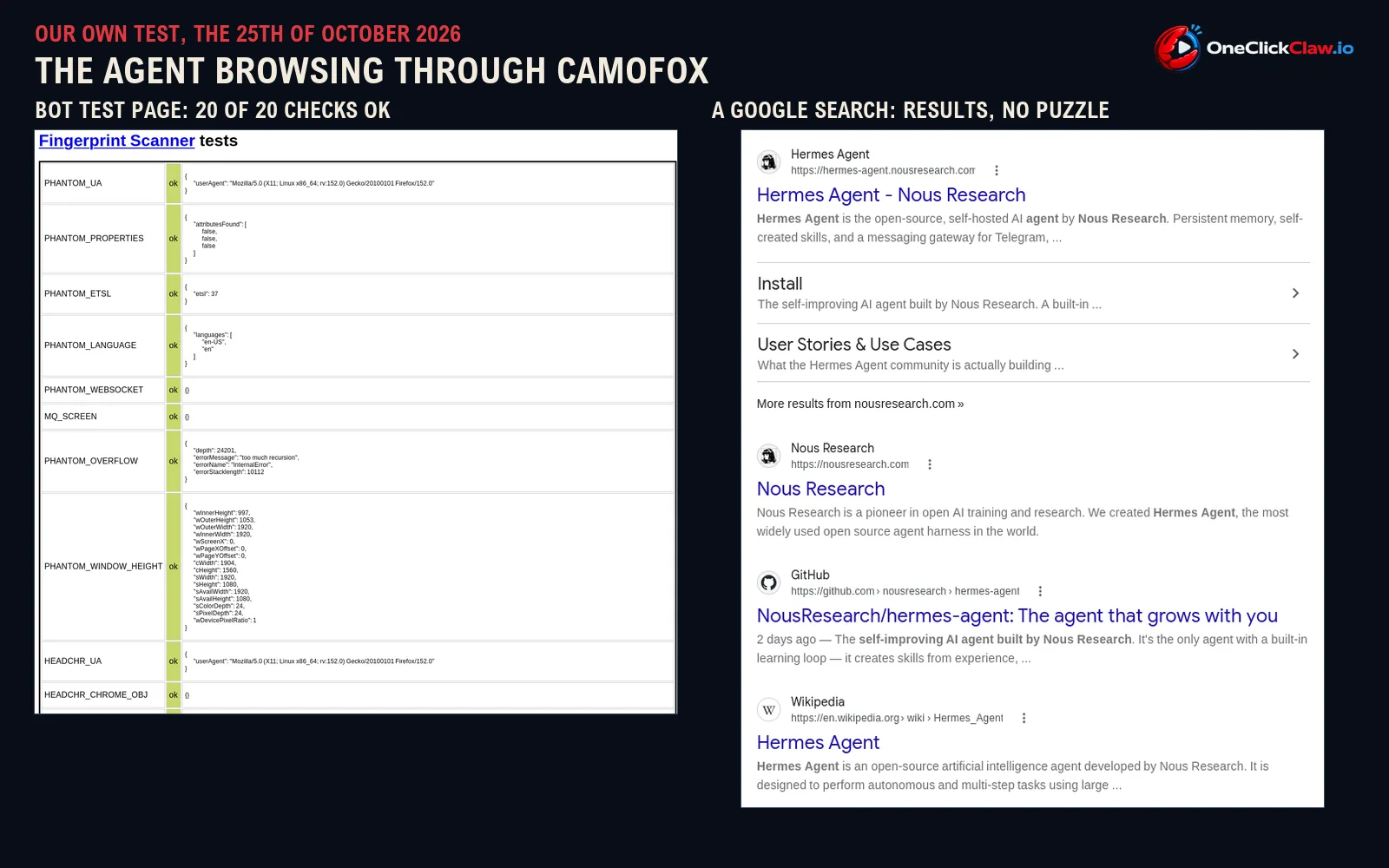
On the 25th of October 2026 OneClickClaw connected Camofox to a Hermes Agent running on a Windows PC and asked the agent, in one plain sentence, to open a public bot test page and report what it found. The page runs the checks that websites commonly use to spot automated browsers.
- The tell-tale sign of browser automation was reported as missing, the result a normal visitor gets.
- All 20 rows of the page's fingerprint scanner said "ok".
- The graphics card was reported as a generic NVIDIA model, different from the card in the machine.
- Asked next to search Google for "Hermes Agent Nous Research", the agent read back the first three results with no puzzle in the way.
The agent did all of it with its browser tools alone.
From built-in feature to official plugin
Camofox has a history inside Hermes. It used to ship inside the agent itself, and Nous Research moved it into its own plugin, according to the official plugins page the company keeps on GitHub. People who already used it are moved over automatically when they update. The last changes before the catalog listing landed on the 23rd of October 2026, including one that makes saved logins work properly on Windows.
Camofox is one of 18 official plugins. Our guide to all 18 explains the others in plain words.
Logins that survive a restart
By default every browsing session starts as a fresh stranger with no cookies, the small files that keep you signed in. With one setting switched on, each Hermes profile keeps its own browser profile, so a site you signed into yesterday still knows you today, according to the plugin's catalog page.
The same page gives one safety tip worth following. Text typed into a form, passwords included, can appear in what the agent reads back from the page. For sign-ins, Nous Research lists a companion plugin, Camofox Human Auth, where you type the password and the one-time codes yourself in a visible window, and the model never sees them.
The browser needs a machine that stays on

Hermes does not start the browser server for you. You run it yourself, as a small program or inside Docker, a tool that runs software in its own sealed box, according to the catalog page. While that machine sleeps, the browser sleeps, and so does every task that needs it. An agent that checks a page every morning needs both the agent and its browser on a machine that never switches off.
That is the job of a server. A Hermes Agent on OneClickClaw runs on its own private server around the clock, so the tasks you hand it keep running while your laptop is closed.
Sources: the Camofox page in the Hermes Agent plugin catalog, the camofox-browser project on GitHub and the Nous Research official plugins repository, all read on the 25th of October 2026. Test run by OneClickClaw on the same date.
Source: hermes-agent.nousresearch.com
Helpful documentation
Want your own Hermes agent running without the setup? We host it on a dedicated EU server. Free for 7 days, no credit card.
Start your free trialGet notified when we publish new articles
No spam, unsubscribe anytime.
By subscribing, you agree to our Privacy Policy.