
Hermes Agent broke after an update: what to check first
Three checks in order when Hermes Agent stops working after an update: the version, the built-in doctor and the gateway, plus how to read the common warnings and get back to a working version.
Since June 2026, posts on the r/hermesagent community on Reddit have described a Hermes Agent that stopped working right after an update. One asks whether updating breaks Hermes at all, another reports Slack and WhatsApp going quiet, and a third only asks for help. On the project's public bug tracker on GitHub, four reports opened between August 14 and September 25 describe an update that failed or said it had failed.
The threads and the tracker point to a small set of causes: a piece of the agent did not restart, a warning outlived the problem, or an add on was switched off. The checks below go in order, and nothing here deletes anything.
Before you touch anything
Two facts from the official Hermes Agent update guide change what you should do.
First, before every update Hermes saves a copy of your settings for every profile. A profile is one named setup of the agent, with its own keys and chat apps. The copy holds the settings file, the keys file, the sign in file, the pairing with your chat apps and your scheduled jobs.
Second, after the new code is downloaded, Hermes tries to load its own key files. If any fails, it puts the previous version back on its own.
So your keys, pairings and settings are most likely still there. Do not reinstall yet. Do not delete folders. Run the three checks first.
Check 1: which version is actually running
Open a terminal on the machine that runs Hermes and type:
hermes --version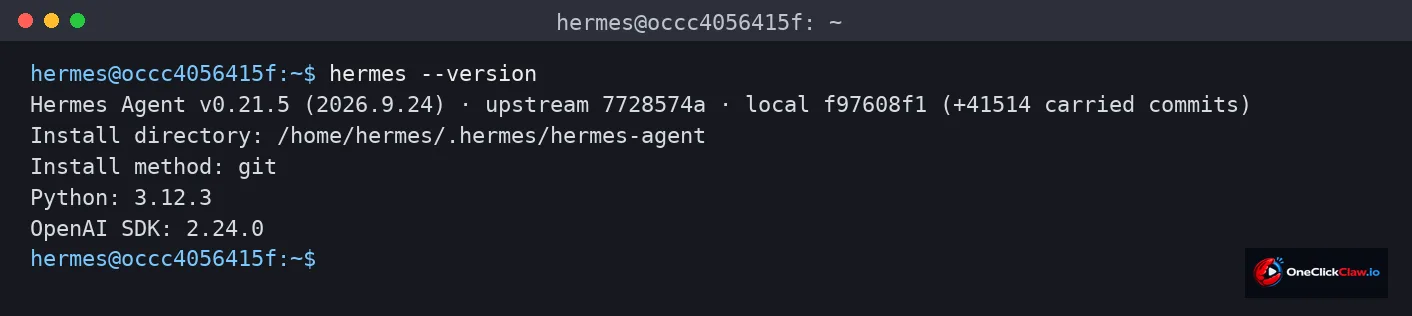
The update guide lists this among the first checks after any update. If the number moved, the new code landed and the problem sits somewhere else. If it did not move, the update stopped partway or never started.
One detail matters over a remote connection: if your terminal drops, the update keeps running and writes every line to its update log in the Hermes logs folder, according to the same guide. Read that log before running the update again.
Check 2: let Hermes examine itself
hermes doctor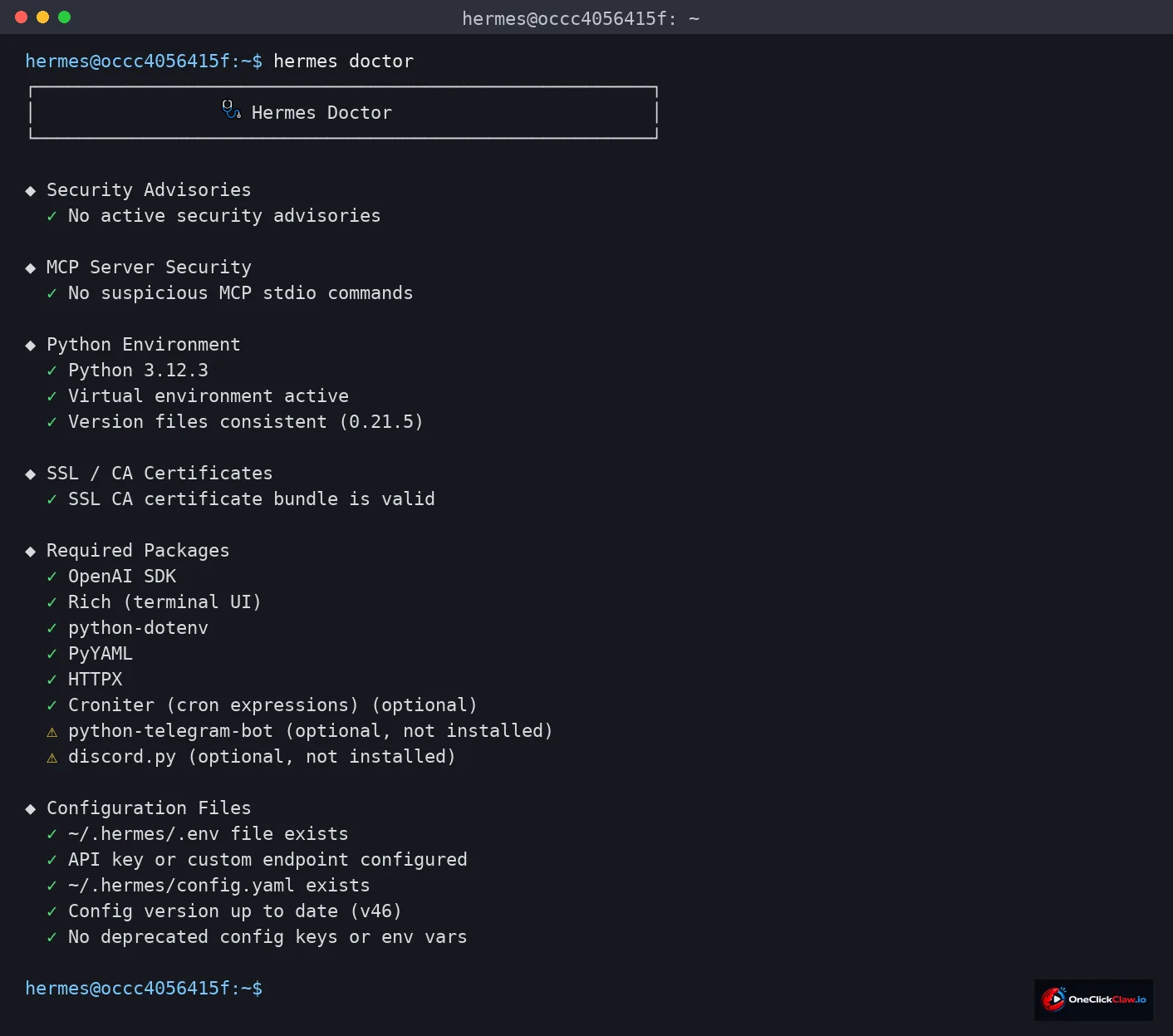
The doctor checks your settings, the software pieces Hermes depends on and the health of its services, one line per finding, as the update guide describes it. Green ticks passed. Yellow triangles are warnings, and those are the lines to read.
- A missing piece of software means the code arrived but what it needs did not finish installing.
- A settings warning usually means a setting changed its name in the new release.
- A warning marked optional, like the two in the picture above, points to an add on you have not chosen to install.
Check 3: is the gateway awake
The gateway is the part of Hermes that keeps your chat apps connected. When Telegram, Slack or WhatsApp stop answering after an update, check it first. Two reports on the r/hermesagent community describe this: Slack and WhatsApp going quiet on September 17, and a remote desktop connection failing on September 23.
hermes gateway status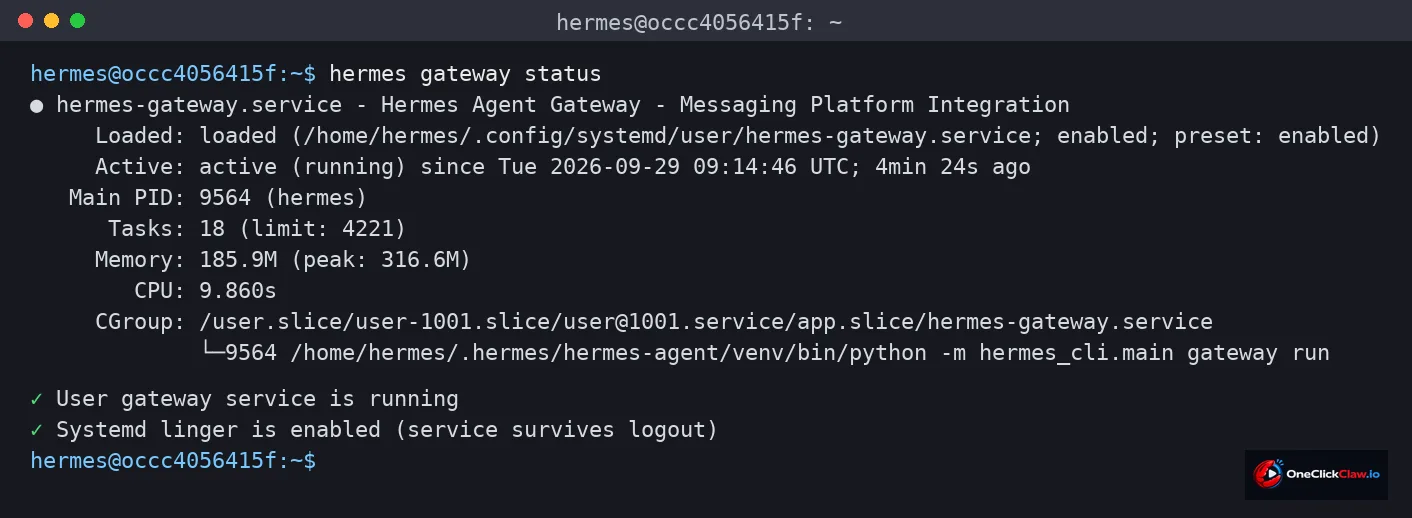
If it reports stopped, or running on code older than the version from check 1, restart it:
hermes gateway restartThe update guide describes this restart as drain first: the gateway stops taking new messages, finishes its current work, then exits and comes back. From a chat app you can also send the word update with a slash in front of it. The bot goes offline for about 5 to 15 seconds and then resumes.
How to read the common warnings
"A previous hermes update pulled new code but did not restart running gateways." This line reads as serious, and it can be stale. A report on the public bug tracker, open since September 10 with 21 comments, says the line stays on screen after the gateway has already restarted on the new code. The update guide says the hint clears once the gateway runs the new code, so start with the restart from check 3. If the line stays, the tracker thread says running the update once more while the agent is idle writes a clean record and clears it.
"Failed to update" on the Windows desktop app. A report opened on September 7 describes this message on every update, even when the update had worked. It was marked fixed on September 9, and users still reported it on September 11. Check 1 settles it: if the version number moved, believe the number. One user there also wrote that the update reset the models and providers on their profiles, so check those too.
The update refuses to start on Windows. From August 14 the update failed because the running program file was locked, and that report was closed as fixed on August 20. A newer report, open since September 25 with 22 comments, describes the update stopping when a profile gateway runs in a particular way. The workaround in that thread: stop the gateways, update, start them again.
A plugin went missing. A plugin is an add on with an extra ability. When one no longer fits the new code, Hermes switches it off and lets the update continue, according to the update guide. Turn it back on with the command below, NAME being the plugin's name:
hermes plugins enable NAMEGetting back to a working version
The automatic rollback covers the program code, and only when key files fail to load. The settings snapshot covers settings. Neither covers your data. The update guide is direct: going back to older code does not undo changes to your data, and newer releases can change the data format so older code cannot read it. To run an older version, use a full backup taken before the update.
Two reports on the r/hermesagent community show why: a database corrupted after an update to the latest version on September 1, and sessions gone from every profile after an update on July 16.
For the next update, two commands from the documentation. The first previews the change without touching anything:
hermes update --checkThe second takes a full copy of the Hermes home folder, with settings, keys, sessions, skills and pairings, before pulling the new code:
hermes update --backupHow OneClickClaw handles versions
On OneClickClaw, Hermes Agent runs on a managed server, and the update decision lives on a dashboard card with two choices: stable and latest. Before a server moves to a new version, a snapshot of the whole server is taken. A snapshot is a full copy of the machine at that moment. Going back restores that snapshot, data included, the part the automatic rollback above leaves out.
Plans start at Starter, EUR 14.99 per month, and every plan opens with a free trial of seven days, according to the OneClickClaw plans page. OpenClaw and Hermes Agent cost the same.
The last check: talk to it
Send the agent one message from the chat app you normally use. A reply, on the new version, closes the case.
If there is no reply, go back to check 3, then check 2, with the update log open.
Frequently asked questions
- Does updating Hermes Agent delete my settings?
- According to the official Hermes Agent documentation, settings, keys, pairings and scheduled jobs are copied for every profile before the update. Sessions and the memory database are separate, so take a full backup first if those matter to you.
- The desktop app said the update failed, but the version number changed. Which is right?
- The number. A Windows desktop report on the public bug tracker in September described the failure message appearing on every update, including successful ones.
- Can I go back to the previous version?
- Hermes restores the previous version on its own when the new code fails to load. For anything else the documentation says to use a full backup from before the update, because newer releases can change the data format. On OneClickClaw a snapshot of the whole server is taken before a version change, and going back restores it.
- How long is the agent offline during an update?
- Sent from a chat app, about 5 to 15 seconds, according to the Hermes Agent documentation.
Related guides
- How to Install Hermes Agent and Start Your First ChatInstall Hermes Agent, connect a model, verify your first chat and add Telegram when you want to message it away from your computer.
- How to Lock Down an OpenClaw InstallOpenClaw keeps the Gateway on the local machine and pairs unknown senders by default, while sandboxing waits for the operator. This guide covers the defaults, the documented checks and a five-point check for an install already in use.
- The Terminal Step Is Where Most People StopEvery official OpenClaw install route starts with a terminal command. This guide explains each documented command, what it assumes, how to confirm the install worked, and the managed route that removes the terminal step.
- Hermes Agent Server Requirements: The Missing NumbersThe docs have no system requirements page (issue 73754). From measured reports and our production fleet: 1 GB is a demo, 2 GB is the always-on floor, 4 GB is comfortable, local models start at 8 GB, 2 cores suffice, and 20 GB of disk keeps it boring.