
OpenClaw and Hermes Agent: Mac mini, Raspberry Pi, PC or VPS
A Mac mini, a Raspberry Pi, a home PC and a VPS compared for OpenClaw and Hermes Agent on upfront cost, monthly cost, power, uptime, remote access and upkeep. For an agent that has to answer all day, a small VPS is the default.
An AI agent that answers you on Telegram or Slack needs a machine that stays awake. Both OpenClaw and Hermes Agent use a gateway, the background program that keeps their messaging connections running. Switch the machine off and that connection stops.
So choosing where to run your agent means choosing what keeps it available while you sleep, travel or close your laptop. For an agent you want available throughout the day, a small VPS is the starting point this guide recommends. A VPS, short for virtual private server, is your own virtual computer in a data centre, rented by the month.
That recommendation follows the setup described in OpenClaw's server guide: the agent lives on the server and you reach it from your phone or laptop. Your everyday computer can switch off while the server keeps working.
What the two agents actually need
When the AI model runs through an online provider, the machine at home mainly handles messages, files and tools. OpenClaw's Raspberry Pi guide recommends at least 2 GB of memory and a storage card or drive with at least 16 GB of space. That puts the gateway within reach of modest hardware.
For Hermes Agent, OneClickClaw's sizing guide recommends 2 GB for a continuously running agent and 4 GB for more room to grow. These are practical recommendations from that guide. Your browser tasks, stored files and other tools determine how much extra room you need.
Running the AI model on the same machine changes the calculation. The model itself needs memory and processing power. OpenClaw's Raspberry Pi guide recommends using online models on a Pi. For this comparison, the starting assumption is that the model runs through an online provider.
What each option costs
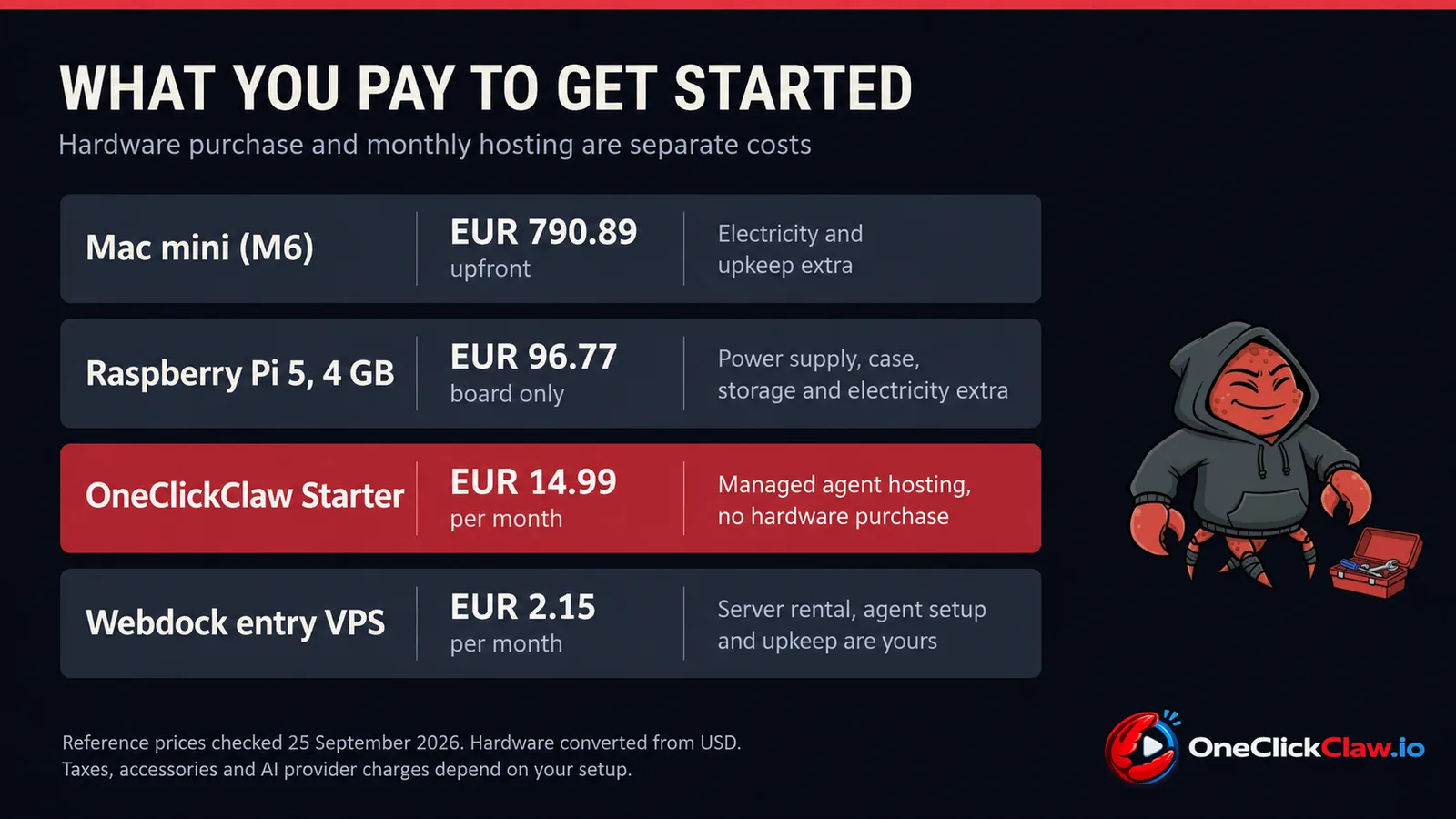
Prices were checked on September 25, 2026. Dollar conversions use the latest available European Central Bank reference rate, dated September 24: one euro equals 1.1367 dollars. Converted hardware prices are reference amounts. Local tax, shipping and retailer prices affect what you pay.
Mac mini. Apple's base M6 model starts at $899 (€790.89), according to its announcement. You buy the computer upfront and then pay for its electricity. If you already own a suitable Mac, the extra hardware purchase can be zero.
Raspberry Pi. The announced price changes put the Pi 5 with 4 GB at $110 (€96.77) for the board. That total combines Raspberry Pi's December price, February increase and April increase. Add a power supply, storage and a case to your shopping list.
Home PC. Reusing a suitable computer means zero additional purchase cost. Its ongoing cost depends on how much electricity it uses and how many extra hours you leave it running.
VPS. As a provider example, Webdock lists an entry server at €2.15 a month with 2 GB of memory. OneClickClaw Starter costs €14.99 a month with 4 GB of memory and managed agent hosting. Those prices buy different levels of service. Both let you start without purchasing a computer.
Keep the AI provider's charges in a separate part of your budget. These figures compare the machines and hosting. The model connection has its own provider terms and any associated usage charges.
The electricity arithmetic
Apple's power measurements put the M6 Mac mini at 4 watts while idle. Using the Eurostat household average of €0.2896 per kilowatt hour for the second half of 2025, running continuously at that level works out to about €10.15 a year, or €0.85 a month.
That is an idle calculation. Your agent's workload, connected equipment and electricity tariff change the bill. For a Raspberry Pi or home PC, measure the complete setup at the socket. A power supply's rating describes its capacity; an electricity estimate needs the machine's actual draw.
The Mac mini example shows why electricity alone makes a weak case for moving an efficient home machine to a VPS. The stronger reasons are avoiding a new hardware purchase, separating the agent from your daily computer and choosing who maintains it.
Why the machine matters
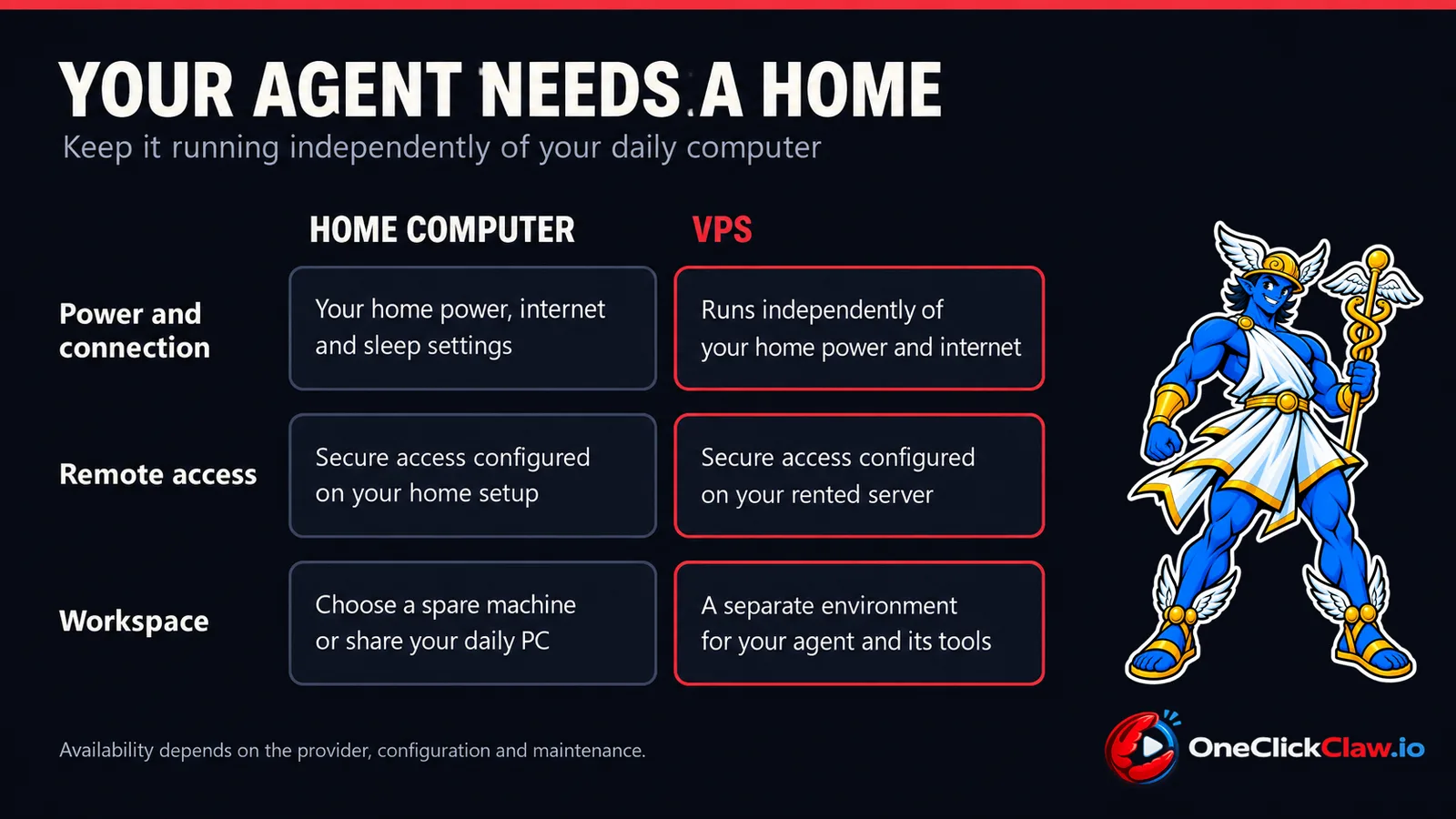
Staying on. The gateway needs to remain running for its messaging connections, as both projects explain. At home, that means keeping the computer awake and connected. A rented server moves that responsibility away from your household power and broadband. Its availability still depends on the provider and on keeping the agent healthy.
Being reachable. OpenClaw recommends a private connection such as Tailscale, which links your devices securely, or an encrypted tunnel for remote access. The same care applies to a home machine and a VPS. Renting a server still leaves you with an access setup to secure.
Having its own workspace. OpenClaw's server guide describes keeping the agent's files and working state on the VPS. That gives the agent a separate home from the computer you use for browsing, games and everyday work. Keep that server dedicated to the agent and its related tools.
When each home option makes sense
Mac mini. Choose it when you also want a Mac for other work or plan to explore models running locally. Apple lists 16 GB of memory in the base model and Hermes Agent supports Macs with Apple Silicon. The model you choose determines whether that memory is enough.
Raspberry Pi. Choose it when building and maintaining the setup is part of the appeal. OpenClaw documents a persistent gateway on a Pi with online models and recommends suitable storage. Hermes Agent also lists support for the processor architecture used by modern Pi computers through Linux. Check the requirements of the individual tools you want to use.
Home PC. Start here if you already have suitable hardware and want to explore the agent. You can learn what tasks matter to you before committing to another machine. Move to a separate server when you want that work to continue independently of your computer's schedule.
The VPS as the default
For a cloud model based agent that should keep working while your laptop is closed, this guide recommends a VPS. The reasons are practical: you can start without buying hardware and give the agent its own running environment. OpenClaw's hosting documentation describes this arrangement directly.
Then choose who looks after it. With a server you manage yourself, you take responsibility for installing the agent, applying updates, securing access and checking that it keeps running. Provider extras vary. Webdock, for example, includes backup snapshots and SSL certificates, which support encrypted connections, even on its entry plan.
Managed agent hosting adds someone to handle the agent setup and ongoing care. That distinction matters when the goal is to use the agent every day and spend less time maintaining its machine.
The managed option
OneClickClaw Starter provides a managed VPS in Denmark for €14.99 a month. It includes two virtual processor cores, 4 GB of memory and 15 GB of fast storage. The plans page lists setup, automatic backups and continuous health monitoring among the included services.
Hermes Agent hosting starts at the same monthly price. Choose the agent for the work you want it to do, then let the server provide its ongoing home.
Start the seven day free trial with a Google account. Use that time to see how an agent fits your day while its server runs independently of your computer.